There's a moment in every real-time application where you watch a supervisor refresh the page for the fifth time because the map stopped updating, and you realize: WebSockets are great until they aren't.
I was building crew location tracking for field workers. The concept was simple—phones send GPS coordinates, supervisors see dots moving on a map. The reality was messier: crews drive through dead zones, tunnels eat signals, and cell towers apparently take coffee breaks. Every time a WebSocket died, my users were back to refreshing.
SignalR is supposed to handle this. It does—but only if you help it.
The Problem With "It Just Works"
SignalR's marketing pitch is that it handles connection complexity for you. It negotiates transports, falls back from WebSockets to long-polling, and reconnects automatically.
What they don't emphasize: the automatic reconnection tries a few times and then gives up. Forever. If you're lucky, you get a disconnected event. If you're not, you get a supervisor staring at a frozen map wondering why Mike hasn't moved in an hour.
I needed something better: connections that would fight to stay alive, gracefully degrade when they couldn't, and always—always—show data, even if it was slightly stale.
Here's how I built it.
The Architecture
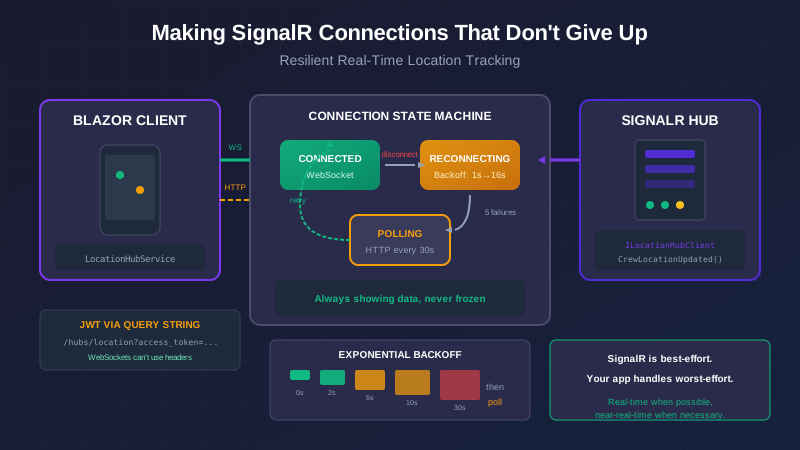
Before diving into code, here's what we're building:
┌─────────────────────────────────────────────────────────────┐
│  Blazor WASM Client                                          │
│  ┌─────────────────────────────────────────────────────────┐│
│  │  LocationHubService                                      ││
│  │  - SignalR connection with custom retry policy           ││
│  │  - Falls back to HTTP polling when SignalR dies          ││
│  │  - Keeps trying to reconnect even while polling          ││
│  └───────────────────────────┬─────────────────────────────┘│
└──────────────────────────────┼──────────────────────────────┘
                               │ WebSocket or HTTP
                               │
┌──────────────────────────────┼──────────────────────────────┐
│  ASP.NET Core API            │                               │
│  ┌───────────────────────────┴───────────────────────────┐  │
│  │  LocationHub                                           │  │
│  │  - Strongly-typed hub interface                        │  │
│  │  - JWT auth via query string (WebSocket quirk)         │  │
│  │  - Sends snapshot on connect, updates on change        │  │
│  └───────────────────────────────────────────────────────┘  │
└──────────────────────────────────────────────────────────────┘
Part 1: The Server Hub
Strongly-Typed Client Interface
This is one of those things that seems like extra work until it saves you from a 2 AM debugging session. Instead of calling methods by magic strings, we define an interface:
public interface ILocationHubClient
{
    Task CrewLocationUpdated(CrewLocationDto location);
    Task CrewLocationsSnapshot(List<CrewLocationDto> locations);
    Task CrewWentOffline(Guid crewMemberId);
}
Now the compiler catches typos. I can refactor method names. IntelliSense works. This is how civilized people do SignalR.
The Hub Itself
[Authorize(Policy = "SupervisorOrAbove")]
public class LocationHub : Hub<ILocationHubClient>
{
    private readonly ILocationService _locationService;
    private readonly ILogger<LocationHub> _logger;

    public const string LocationSubscribersGroup = "LocationSubscribers";

    public LocationHub(ILocationService locationService, ILogger<LocationHub> logger)
    {
        _locationService = locationService;
        _logger = logger;
    }

    public override async Task OnConnectedAsync()
    {
        var userId = Context.UserIdentifier ?? "unknown";
        _logger.LogInformation("Location hub: {ConnectionId} connected (User: {UserId})",
            Context.ConnectionId, userId);

        await Groups.AddToGroupAsync(Context.ConnectionId, LocationSubscribersGroup);

        // Send current state immediately—don't make them wait for the first update
        await SendSnapshotAsync();

        await base.OnConnectedAsync();
    }

    public async Task RequestSnapshot()
    {
        await SendSnapshotAsync();
    }

    private async Task SendSnapshotAsync()
    {
        try
        {
            var locations = await _locationService.GetAllCrewLocationsAsync();
            await Clients.Caller.CrewLocationsSnapshot(locations.ToList());
        }
        catch (Exception ex)
        {
            _logger.LogError(ex, "Failed to send snapshot to {ConnectionId}",
                Context.ConnectionId);
        }
    }
}
Key design decision: we send a full snapshot on connect. When someone reconnects after a dead zone, they get current state immediately. No waiting for the next location update. No stale data.
The JWT Query String Gotcha
WebSockets can't use HTTP headers the way normal requests do. The token has to come in the query string. This requires special handling in your auth configuration:
builder.Services.AddAuthentication(JwtBearerDefaults.AuthenticationScheme)
    .AddJwtBearer(options =>
    {
        options.TokenValidationParameters = new TokenValidationParameters
        {
            // Your normal JWT settings...
        };

        // THIS IS THE PART EVERYONE FORGETS
        options.Events = new JwtBearerEvents
        {
            OnMessageReceived = context =>
            {
                var accessToken = context.Request.Query["access_token"];
                var path = context.HttpContext.Request.Path;

                if (!string.IsNullOrEmpty(accessToken) &&
                    path.StartsWithSegments("/hubs"))
                {
                    context.Token = accessToken;
                }
                return Task.CompletedTask;
            }
        };
    });
Without this, you get mysterious 401 errors on WebSocket connections while your normal API works fine. Ask me how I know.
Broadcasting Location Updates
When a location comes in from a mobile device, we save it and broadcast:
public async Task RecordLocationAsync(Guid crewMemberId, LocationUpdateDto location)
{
    // ... save to database ...

    var dto = new CrewLocationDto
    {
        CrewMemberId = crewMember.Id,
        Name = crewMember.Name,
        Latitude = location.Latitude,
        Longitude = location.Longitude,
        LastUpdated = location.CapturedAt,
        IsClockedIn = crewMember.CurrentWorkOrderId.HasValue
    };

    // Send to everyone watching
    await _hubContext.Clients
        .Group(LocationHub.LocationSubscribersGroup)
        .CrewLocationUpdated(dto);
}
Notice we don't throw if the broadcast fails. Location recording is critical; broadcasting is nice-to-have. Worst case, the next poll will catch them up.
Part 2: The Resilient Blazor Client
This is where the real work happens. Our client service needs to:
- Connect via SignalR
- Reconnect automatically with exponential backoff
- Fall back to HTTP polling when SignalR fails repeatedly
- Keep trying to restore SignalR even while polling
- Never leave the user staring at stale data
The Service Interface
public interface ILocationHubService : IAsyncDisposable
{
    event Action<CrewLocationDto>? OnLocationUpdated;
    event Action<List<CrewLocationDto>>? OnSnapshot;
    event Action<Guid>? OnCrewOffline;
    event Action<LocationConnectionState>? OnConnectionStateChanged;

    LocationConnectionState ConnectionState { get; }

    Task ConnectAsync();
    Task DisconnectAsync();
    Task RequestSnapshotAsync();
}
The event pattern here is intentional. Blazor components subscribe, receive updates, call StateHasChanged. Clean separation. Multiple components can listen. Easy testing.
The Implementation
public class LocationHubService : ILocationHubService
{
    private HubConnection? _hubConnection;
    private Timer? _pollingTimer;
    private int _reconnectAttempts;
    private const int MaxReconnectAttempts = 5;
    private const int PollingIntervalMs = 30_000;

    private LocationConnectionState _connectionState = LocationConnectionState.Disconnected;
    public LocationConnectionState ConnectionState
    {
        get => _connectionState;
        private set
        {
            if (_connectionState != value)
            {
                _connectionState = value;
                OnConnectionStateChanged?.Invoke(value);
            }
        }
    }

    public async Task ConnectAsync()
    {
        if (ConnectionState == LocationConnectionState.Connecting ||
            ConnectionState == LocationConnectionState.Connected)
            return;

        ConnectionState = LocationConnectionState.Connecting;
        _reconnectAttempts = 0;

        await TryConnectSignalRAsync();
    }

    private async Task TryConnectSignalRAsync()
    {
        try
        {
            var token = await _tokenStorage.GetAccessTokenAsync();
            if (string.IsNullOrEmpty(token))
            {
                StartPollingFallback();
                return;
            }

            _hubConnection = new HubConnectionBuilder()
                .WithUrl(_hubUrl, options =>
                {
                    options.AccessTokenProvider = () => Task.FromResult(token)!;
                })
                .WithAutomaticReconnect(new ExponentialBackoffRetryPolicy())
                .Build();

            RegisterHubHandlers();
            await _hubConnection.StartAsync();

            ConnectionState = LocationConnectionState.Connected;
            _reconnectAttempts = 0;
        }
        catch (Exception ex)
        {
            _logger.LogWarning(ex, "SignalR connection failed (attempt {Attempt})",
                _reconnectAttempts + 1);

            _reconnectAttempts++;
            if (_reconnectAttempts >= MaxReconnectAttempts)
            {
                // Give up on SignalR, but keep showing data via polling
                StartPollingFallback();
            }
            else
            {
                await Task.Delay(GetBackoffDelay());
                await TryConnectSignalRAsync();
            }
        }
    }

    private int GetBackoffDelay()
    {
        // 1s, 2s, 4s, 8s, 16s
        return (int)Math.Min(Math.Pow(2, _reconnectAttempts - 1) * 1000, 30000);
    }
}
The key insight: connection failure isn't a terminal state. We try SignalR with increasing delays. After five failures, we switch to polling. But we're still showing data—just slightly less real-time.
The Polling Fallback
private void StartPollingFallback()
{
    ConnectionState = LocationConnectionState.PollingFallback;
    _logger.LogInformation("Starting HTTP polling fallback");

    StopPolling();
    _ = FetchLocationsViaHttpAsync(); // Fetch immediately

    _pollingTimer = new Timer(PollingIntervalMs);
    _pollingTimer.Elapsed += async (_, _) => await FetchLocationsViaHttpAsync();
    _pollingTimer.Start();
}

private async Task FetchLocationsViaHttpAsync()
{
    try
    {
        var token = await _tokenStorage.GetAccessTokenAsync();
        var request = new HttpRequestMessage(HttpMethod.Get, "/api/location/crew");
        request.Headers.Authorization =
            new AuthenticationHeaderValue("Bearer", token);

        var response = await _httpClient.SendAsync(request);
        if (response.IsSuccessStatusCode)
        {
            var locations = await response.Content
                .ReadFromJsonAsync<List<CrewLocationDto>>();
            if (locations != null)
                OnSnapshot?.Invoke(locations);
        }
    }
    catch (Exception ex)
    {
        _logger.LogWarning(ex, "HTTP polling failed");
    }
}
Thirty-second updates aren't as good as instant WebSocket pushes. But they're infinitely better than a frozen screen.
Custom Retry Policy
SignalR's WithAutomaticReconnect uses a default policy that gives up too quickly for my taste. Here's one that tries harder:
internal class ExponentialBackoffRetryPolicy : IRetryPolicy
{
    private static readonly TimeSpan?[] RetryDelays =
    [
        TimeSpan.FromSeconds(0),   // Try immediately
        TimeSpan.FromSeconds(2),
        TimeSpan.FromSeconds(5),
        TimeSpan.FromSeconds(10),
        TimeSpan.FromSeconds(30),
        null                        // Then give up
    ];

    public TimeSpan? NextRetryDelay(RetryContext retryContext)
    {
        return retryContext.PreviousRetryCount < RetryDelays.Length
            ? RetryDelays[retryContext.PreviousRetryCount]
            : null;
    }
}
Wiring It Up in a Component
@page "/crew-locations"
@implements IDisposable
@inject ILocationHubService LocationHub

<ConnectionStatusBar State="@_connectionState" />
<CrewMap Crews="@_locations" OnMarkerClicked="SelectCrew" />

@code {
    private List<CrewLocationDto> _locations = new();
    private LocationConnectionState _connectionState;

    protected override async Task OnInitializedAsync()
    {
        LocationHub.OnSnapshot += HandleSnapshot;
        LocationHub.OnLocationUpdated += HandleUpdate;
        LocationHub.OnConnectionStateChanged += HandleConnectionChange;

        await LocationHub.ConnectAsync();
    }

    private void HandleSnapshot(List<CrewLocationDto> locations)
    {
        _locations = locations;
        InvokeAsync(StateHasChanged);
    }

    private void HandleUpdate(CrewLocationDto location)
    {
        var index = _locations.FindIndex(l => l.CrewMemberId == location.CrewMemberId);
        if (index >= 0)
            _locations[index] = location;
        else
            _locations.Add(location);

        InvokeAsync(StateHasChanged);
    }

    private void HandleConnectionChange(LocationConnectionState state)
    {
        _connectionState = state;
        InvokeAsync(StateHasChanged);
    }

    public void Dispose()
    {
        LocationHub.OnSnapshot -= HandleSnapshot;
        LocationHub.OnLocationUpdated -= HandleUpdate;
        LocationHub.OnConnectionStateChanged -= HandleConnectionChange;
    }
}
Notice InvokeAsync(StateHasChanged). SignalR events fire on a background thread. Blazor UI updates need the render thread. This one line prevents a category of bugs that will make you question your life choices.
The Traps I Hit
401 on WebSocket, 200 Everywhere Else
WebSockets don't send headers like normal requests. The token must come via query string. If you didn't add the OnMessageReceived handler, you'll get 401s that seem to defy logic.
CORS Credentials Error
SignalR with credentials requires you to specify origins explicitly. You can't use AllowAnyOrigin() with AllowCredentials(). Use SetIsOriginAllowed instead:
policy.SetIsOriginAllowed(_ => true)
      .AllowCredentials();
UI Doesn't Update
Events fire. Handler runs. Nothing changes on screen. The fix is always InvokeAsync(StateHasChanged). SignalR events don't automatically marshal to the UI thread.
Memory Leaks from Event Handlers
If you subscribe in OnInitializedAsync and don't unsubscribe in Dispose, your component will be kept alive by the event reference. You'll start seeing weird behavior as "disposed" components respond to events.
Always clean up:
public void Dispose()
{
    LocationHub.OnSnapshot -= HandleSnapshot;
    LocationHub.OnLocationUpdated -= HandleUpdate;
}
The Mental Model
Here's what finally made SignalR click for me:
SignalR is a best-effort delivery system. Your app needs to handle worst-effort gracefully.
Don't build assuming connections are stable. Build assuming they'll drop constantly. Then, when they don't, everything feels snappy. When they do, nobody notices.
The supervisor tracking their crews doesn't care about WebSocket protocol negotiations. They care that the map shows where people are. Give them that, with whatever transport works. Real-time when possible, near-real-time when necessary.
This is part of a series on building field service applications with Blazor. See also: When Your Map Library Doesn't Speak C# for integrating Leaflet.js with Blazor WASM, and The Permission Nobody Told Us About for why the GPS data feeding this hub had a 24-minute gap.
The full source for the location hub and client service—including connection status indicators and unit tests—is in the CrewTrack repository.