I needed to show crew members moving around on a map. Little dots with initials, gliding across roads, updating in real-time. Simple, right?
The problem: I'm building in Blazor WebAssembly, and the best mapping library on the planet—Leaflet.js—speaks JavaScript. My entire application speaks C#. These two languages looked at each other across the runtime divide like strangers at a wedding who'd been assigned the same table.
This is the story of making them talk.
The JavaScript Interop Problem
If you've done any Blazor development, you've probably heard "just use IJSRuntime" tossed around like it's trivial. It isn't. The moment you start passing data back and forth between C# and JavaScript, you enter a world of serialization edge cases, lifecycle mismatches, and the ever-present question: where does state live?
My first attempt looked something like this:
await JS.InvokeVoidAsync("L.map", elementId);
Which immediately threw an error because Leaflet wasn't loaded yet.
So I waited for OnAfterRenderAsync. That worked, except now I had a map instance in JavaScript that I couldn't reference from C#. Every subsequent call required me to somehow find that map again.
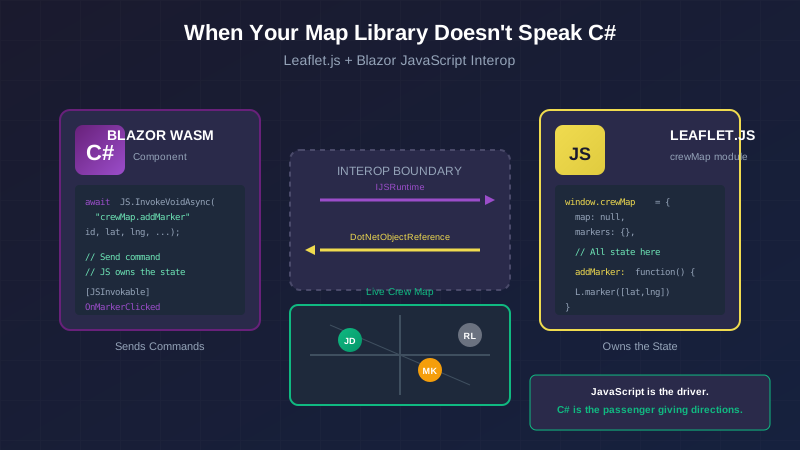
After a few hours of this, I stepped back and asked myself a better question: What if JavaScript owned all the state, and C# just told it what to do?
That's when things clicked.
The Architecture That Actually Works
Instead of trying to juggle Leaflet objects across the interop boundary, I created a JavaScript module that encapsulates everything. C# doesn't hold references to map objects. It just calls methods like "add a marker here" and "remove that marker" and "destroy everything when we're done."
Here's what that looks like.
Step 1: Add Leaflet via CDN
In your wwwroot/index.html, add the CSS in the <head>:
<link rel="stylesheet"
      href="https://unpkg.com/[email protected]/dist/leaflet.css"
      integrity="sha256-p4NxAoJBhIIN+hmNHrzRCf9tD/miZyoHS5obTRR9BMY="
      crossorigin="" />
And the scripts before </body>:
<script src="https://unpkg.com/[email protected]/dist/leaflet.js"
        integrity="sha256-20nQCchB9co0qIjJZRGuk2/Z9VM+kNiyxNV1lvTlZBo="
        crossorigin=""></script>
<script src="js/leaflet-interop.js"></script>
Why CDN for a production app? Because we're using one map component in one place. The overhead of bundling Leaflet into our build isn't worth it for this use case.
Step 2: The JavaScript Interop Layer
This is where the magic happens. Create wwwroot/js/leaflet-interop.js:
window.crewMap = {
    // All state lives here—not in Blazor
    map: null,
    markers: {},
    geofences: {},
    dotNetRef: null,

    initialize: function(elementId, lat, lng, zoom, dotNetRef) {
        this.dotNetRef = dotNetRef;

        const container = document.getElementById(elementId);
        if (!container) {
            console.error(`[crewMap] Element '${elementId}' not found`);
            return;
        }

        this.map = L.map(elementId, {
            zoomControl: true,
            attributionControl: true
        }).setView([lat, lng], zoom);

        L.tileLayer('https://{s}.tile.openstreetmap.org/{z}/{x}/{y}.png', {
            attribution: '© OpenStreetMap',
            maxZoom: 19
        }).addTo(this.map);
    },

    addMarker: function(id, lat, lng, name, initials, status, jobSiteName, lastUpdate) {
        if (!this.map) return;

        // Remove existing marker if updating
        if (this.markers[id]) {
            this.map.removeLayer(this.markers[id]);
        }

        const iconHtml = `
            <div class="crew-marker crew-marker-${status}">
                <span class="crew-marker-initials">${this.escapeHtml(initials)}</span>
            </div>
        `;

        const icon = L.divIcon({
            className: 'crew-marker-wrapper',
            html: iconHtml,
            iconSize: [40, 40],
            iconAnchor: [20, 20],
            popupAnchor: [0, -25]
        });

        const marker = L.marker([lat, lng], { icon: icon })
            .addTo(this.map)
            .bindPopup(this.createPopupHtml(name, status, jobSiteName, lastUpdate));

        // Here's the callback to Blazor
        marker.on('click', () => {
            if (this.dotNetRef) {
                this.dotNetRef.invokeMethodAsync('OnMarkerClickedJs', id);
            }
        });

        this.markers[id] = marker;
    },

    removeMarker: function(id) {
        if (this.markers[id]) {
            this.map.removeLayer(this.markers[id]);
            delete this.markers[id];
        }
    },

    fitBounds: function() {
        if (!this.map || Object.keys(this.markers).length === 0) return;
        const group = new L.featureGroup(Object.values(this.markers));
        this.map.fitBounds(group.getBounds().pad(0.1));
    },

    destroy: function() {
        if (this.map) {
            this.map.remove();
            this.map = null;
            this.markers = {};
            this.geofences = {};
            this.dotNetRef = null;
        }
    },

    // XSS protection—never trust user data in innerHTML
    escapeHtml: function(str) {
        if (!str) return '';
        const div = document.createElement('div');
        div.textContent = str;
        return div.innerHTML;
    },

    createPopupHtml: function(name, status, jobSiteName, lastUpdate) {
        const statusLabel = {
            'on-site': 'On Site',
            'in-transit': 'In Transit',
            'offline': 'Offline',
            'unknown': 'Unknown'
        }[status] || 'Unknown';

        return `
            <div class="crew-popup">
                <strong>${this.escapeHtml(name)}</strong>
                <span class="crew-popup-status crew-popup-status-${status}">${statusLabel}</span>
                ${jobSiteName ? `<span>${this.escapeHtml(jobSiteName)}</span>` : ''}
                <span>${this.escapeHtml(lastUpdate)}</span>
            </div>
        `;
    }
};
Notice what's happening here:
- All state stays in JavaScript. The map, markers, geofences—everything.
- Blazor sends commands. "Add this marker." "Remove that one." "Destroy everything."
- JavaScript sends events back. When someone clicks a marker, we use
dotNetRef.invokeMethodAsyncto notify Blazor.
This separation is everything. I'm not trying to hold Leaflet objects in C#. I'm not serializing marker references across the boundary. I'm just passing primitives—strings, numbers, coordinates—and letting each side manage its own complexity.
Step 3: Custom Marker Styles
The cool thing about L.divIcon is that you can use regular HTML and CSS for markers. Create wwwroot/css/crew-map.css:
.crew-marker-wrapper {
    background: none !important;
    border: none !important;
}

.crew-marker {
    width: 40px;
    height: 40px;
    border-radius: 12px;
    display: flex;
    align-items: center;
    justify-content: center;
    font-weight: 600;
    font-size: 14px;
    color: white;
    box-shadow: 0 2px 8px rgba(0, 0, 0, 0.3);
    transition: transform 0.2s, box-shadow 0.2s;
}

.crew-marker:hover {
    transform: scale(1.1);
}

.crew-marker-on-site {
    background: linear-gradient(135deg, #10B981, #059669);
    animation: pulse-green 2s infinite;
}

.crew-marker-in-transit {
    background: linear-gradient(135deg, #F59E0B, #D97706);
}

.crew-marker-offline {
    background: linear-gradient(135deg, #6B7280, #4B5563);
}

@keyframes pulse-green {
    0%, 100% { box-shadow: 0 0 0 0 rgba(16, 185, 129, 0.4); }
    50% { box-shadow: 0 0 0 10px rgba(16, 185, 129, 0); }
}
Now markers pulse when crew members are on-site, turn amber when they're driving, and go gray when offline. All pure CSS, no JavaScript animation code.
Step 4: The Blazor Component
Here's where it all comes together. Create CrewMap.razor:
@inject IJSRuntime JS
@implements IAsyncDisposable

<div id="@_mapElementId" class="crew-map-container" style="height: @Height;"></div>

@code {
    [Parameter] public List<CrewLocationDto> Crews { get; set; } = new();
    [Parameter] public EventCallback<Guid> OnMarkerClicked { get; set; }
    [Parameter] public double InitialLatitude { get; set; } = 43.0389;
    [Parameter] public double InitialLongitude { get; set; } = -87.9065;
    [Parameter] public int InitialZoom { get; set; } = 10;
    [Parameter] public string Height { get; set; } = "500px";

    private readonly string _mapElementId = $"crew-map-{Guid.NewGuid():N}";
    private DotNetObjectReference<CrewMap>? _dotNetRef;
    private bool _mapInitialized = false;
    private HashSet<Guid> _currentMarkerIds = new();

    protected override async Task OnAfterRenderAsync(bool firstRender)
    {
        if (firstRender)
        {
            _dotNetRef = DotNetObjectReference.Create(this);

            await JS.InvokeVoidAsync(
                "crewMap.initialize",
                _mapElementId,
                InitialLatitude,
                InitialLongitude,
                InitialZoom,
                _dotNetRef);

            _mapInitialized = true;
            await UpdateMarkersAsync();
        }
        else if (_mapInitialized)
        {
            await UpdateMarkersAsync();
        }
    }

    private async Task UpdateMarkersAsync()
    {
        var newMarkerIds = new HashSet<Guid>();

        foreach (var crew in Crews)
        {
            newMarkerIds.Add(crew.CrewMemberId);

            await JS.InvokeVoidAsync(
                "crewMap.addMarker",
                crew.CrewMemberId.ToString(),
                crew.Latitude,
                crew.Longitude,
                crew.Name,
                GetInitials(crew.Name),
                DeriveStatus(crew),
                crew.CurrentJobSiteName ?? "",
                GetTimeSinceUpdate(crew.LastUpdated));
        }

        // Remove markers that are no longer in the list
        foreach (var oldId in _currentMarkerIds.Except(newMarkerIds))
        {
            await JS.InvokeVoidAsync("crewMap.removeMarker", oldId.ToString());
        }

        _currentMarkerIds = newMarkerIds;

        if (Crews.Count > 0)
        {
            await JS.InvokeVoidAsync("crewMap.fitBounds");
        }
    }

    [JSInvokable]
    public async Task OnMarkerClickedJs(string crewMemberId)
    {
        if (Guid.TryParse(crewMemberId, out var id))
        {
            await OnMarkerClicked.InvokeAsync(id);
        }
    }

    public async ValueTask DisposeAsync()
    {
        if (_mapInitialized)
        {
            try { await JS.InvokeVoidAsync("crewMap.destroy"); }
            catch (JSDisconnectedException) { }
        }
        _dotNetRef?.Dispose();
    }

    private static string DeriveStatus(CrewLocationDto crew)
    {
        if (!crew.IsClockedIn) return "offline";
        if ((DateTime.UtcNow - crew.LastUpdated).TotalMinutes > 30) return "unknown";
        return !string.IsNullOrEmpty(crew.CurrentJobSiteName) ? "on-site" : "in-transit";
    }

    private static string GetInitials(string name)
    {
        if (string.IsNullOrWhiteSpace(name)) return "??";
        var parts = name.Split(' ', StringSplitOptions.RemoveEmptyEntries);
        if (parts.Length >= 2) return $"{parts[0][0]}{parts[^1][0]}".ToUpper();
        return parts[0].Length >= 2 ? $"{parts[0][0]}{parts[0][1]}".ToUpper() : "??";
    }

    private static string GetTimeSinceUpdate(DateTime lastUpdate)
    {
        var elapsed = DateTime.UtcNow - lastUpdate;
        if (elapsed.TotalMinutes < 1) return "just now";
        if (elapsed.TotalMinutes < 60) return $"{(int)elapsed.TotalMinutes}m ago";
        if (elapsed.TotalHours < 24) return $"{(int)elapsed.TotalHours}h ago";
        return $"{(int)elapsed.TotalDays}d ago";
    }
}
The key insight is DotNetObjectReference. This creates a reference that JavaScript can hold onto and use to call back into our component. Without it, you're stuck with static methods, which defeats the whole purpose of component-based design.
The Traps I Fell Into (So You Don't Have To)
The Map Won't Render
Leaflet requires an explicit height on its container. If you see a blank gray box:
.crew-map-container {
    width: 100%;
    height: 500px; /* This MUST be explicit */
}
Markers Don't Appear
Check your browser console. Common causes:
- Map wasn't initialized yet (race condition)
- Coordinates are NaN (serialization issue)
- CSS file not loaded (markers are there but invisible)
Memory Leaks
If you navigate away from the page and back, do you now have two map instances? This is why IAsyncDisposable is non-negotiable:
public async ValueTask DisposeAsync()
{
    await JS.InvokeVoidAsync("crewMap.destroy");
    _dotNetRef?.Dispose();
}
The JSDisconnectedException catch is for when the user closes the browser tab—you can't call into JavaScript at that point, and that's fine.
The Callback Doesn't Fire
Make sure your [JSInvokable] method is public and the method name in JavaScript exactly matches. Case sensitivity will get you.
The Mental Model
Here's what finally made this click for me:
JavaScript is the driver. C# is the passenger giving directions.
C# says "turn here" (add a marker). JavaScript does the actual turning. C# never grabs the wheel directly. When something interesting happens—a marker gets clicked—JavaScript taps C# on the shoulder and says "hey, that thing you might care about just happened."
This isn't how you'd structure a pure C# application. But it's exactly how you should structure a Blazor app that needs to work with JavaScript libraries. Fighting this pattern will cost you hours. Embracing it will save you sanity.
Usage
Once you've got the component, using it is exactly as simple as Blazor should be:
@page "/crew-locations"

<CrewMap Crews="@_crewLocations"
         OnMarkerClicked="HandleMarkerClicked"
         Height="600px" />

@code {
    private List<CrewLocationDto> _crewLocations = new();

    private void HandleMarkerClicked(Guid crewId)
    {
        // Do something with the selected crew member
    }
}
And now you have real-time crew tracking on a map, updating as locations stream in, with click handling, custom styling, and proper cleanup.
All because you let JavaScript be JavaScript.
This is part of a series on building real-time location tracking with Blazor. Coming up: Making SignalR Connections Resilient for when your field workers drive through dead zones.
The full source for the CrewMap component—including geofence overlays and additional marker animations—is in the CrewTrack repository.