1435 seconds.
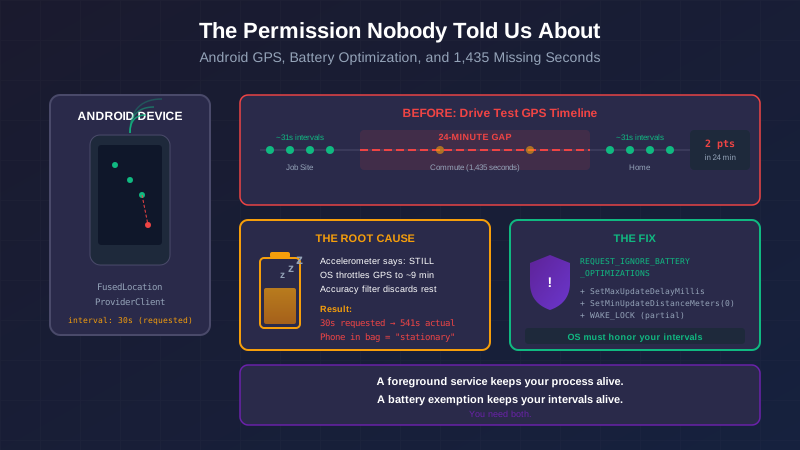
That's the gap. One number, sitting in a column of GPS records from a drive-test day. The car left the job site at 4:30 PM and arrived home at 4:54 PM. Twenty-four minutes of driving, captured as a single 1,435-second silence in the database.
This is the story of what caused that silence, what it took to find it, and the one permission that every serious location tracking app uses and nobody told us we needed.
The Problem We Were Trying to Solve
CrewTrack tracks field crew locations for time clock accuracy. When a crew member clocks in, the app records GPS positions at regular intervals. The records get synced to the server, and a supervisor can see the crew trail on a map — where each person was, when, for how long. It's the difference between "the timesheet says 8 hours" and "the timesheet says 8 hours and here's the GPS trail to verify it."
For this to work, the GPS needs to be reliable. Not just when the app is open and the screen is on, but in the background — while the phone is in someone's pocket, in their truck, in a tool bag on a job site.
That's where Android makes things interesting.
The First Test Was Disqualifying
Our initial implementation used Task.Delay in a polling loop inside a foreground service. Every 30 seconds, the loop would wake up, call Geolocation.Default.GetLocationAsync(), and queue the result.
The field test results were:
- Expected: ~720 GPS points over 6 hours
- Actual: 21 points
- Moving intervals: 131–566 seconds instead of 30 seconds
- Stationary intervals: 18–69 minutes instead of 5 minutes
Task.Delay fights Android's power manager. Doze mode batches timer wake-ups. Even with a foreground service — which is supposed to exempt your process from this — a Task.Delay loop is still subject to OS-level timer coalescing. You request a wake-up in 30 seconds. The OS says "noted" and delivers it whenever it feels like it.
The fix was to replace Task.Delay polling with FusedLocationProviderClient and LocationCallback. Instead of asking for a location on a timer, you register a callback and the OS delivers locations to you. The OS schedules the GPS hardware; your code just receives the results.
var locationRequest = new LocationRequest.Builder(
        Priority.PriorityHighAccuracy,
        intervalMs)
    .SetMinUpdateIntervalMillis(intervalMs / 2)
    .SetWaitForAccurateLocation(false)
    .Build();

_fusedClient.RequestLocationUpdates(locationRequest, _locationCallback, Looper.MainLooper!);
This is the correct approach. Google documents it as the right way to do background location on Android. It worked — at home, on a clear day, with the phone sitting on a desk. Then we took the phone to work.
The Drive Test
A real field test: phone in a work bag on the car seat, 30-minute commute each way, 10 hours at a job site in a data center with poor cell coverage. Full day. Full data.
The results looked better on the surface:
| Scenario | Interval | Assessment |
|---|---|---|
| At home (stationary) | ~31 seconds | ✅ |
| At job site all day | ~541 seconds | ✅ adaptive throttle working |
| App brought to foreground | ~30 seconds | ✅ |
| Morning commute (30 min) | 26-minute gap | ❌ |
| Evening commute (30 min) | 24-minute gap | ❌ |
The FusedLocationProvider was delivering excellent results when the phone was stationary and had a clear sky. During both commutes — the exact scenario where location matters most for understanding crew movement — it produced almost nothing.
The Wrong Theory (Mostly)
Our first hypothesis was the 75-meter accuracy filter we had recently added. When a GPS fix comes back with poor accuracy, it's not useful for geofence calculations — a 100-meter uncertainty radius on a job site that's 50 meters wide means you can't tell if someone is on-site or not. So we'd added a filter that discarded fixes worse than 75 meters.
A phone in a bag while driving can produce poor GPS accuracy. The bag and the car body block some sky view. Maybe we were discarding all the in-transit fixes ourselves.
This was partially true. To verify it, we needed the logcat — Android's system log — to see what the FusedProvider was actually delivering versus what we were accepting.
adb logcat -d -T "03-04 07:00:00.000" > logcat-raw.txt
The raw file came back at 36MB, 262,000 lines. Rather than searching for our app's debug output (which, as it turns out, requires knowing the exact logcat tag for .NET MAUI's Debug.WriteLine — it's not obvious), we searched for the OS-level signal: FLP_FULL_POWER_LOCATION_RESULT, the ActivityManager event that fires when FusedLocationProvider delivers a location to any app.
grep "FLP_FULL_POWER_LOCATION_RESULT" logcat-raw.txt | grep "^03-04 16:" | grep -oE "^03-04 16:[0-9]+:[0-9]+" | sort -u
The results:
16:05:13   ← job site, stationary
16:14:14   ← job site
16:23:14   ← job site
16:27:02   ← app opened, 30s intervals begin
16:27:23
16:27:53
...
16:30:24   ← last job site point
16:38:57   ← DURING THE DRIVE — not in database
16:47:58   ← DURING THE DRIVE — not in database
16:54:27   ← home arrival
The FusedProvider was delivering during the drive — at 8.5 and 17.5 minutes into the commute. Those two deliveries don't appear in our database. The accuracy filter discarded them.
But here's the deeper problem: two deliveries in 24 minutes. The location request said 30 seconds. We got two attempts spaced 9 minutes apart. Why?
Android Thought the Phone Was Stationary
The 9-minute interval (541 seconds) is identical to the stationary interval we observed at the job site all day. It's not a coincidence.
Android's FusedLocationProviderClient uses activity recognition to adapt its behavior. Activity recognition doesn't use GPS to determine if you're moving — it uses the accelerometer. A phone in a fabric bag on a padded car seat produces a heavily dampened accelerometer signal. The OS classifies the phone as STILL.
When the OS thinks you're stationary, FusedProvider reduces its GPS sampling rate to save battery. Your setIntervalMillis(30_000) request becomes advisory. The OS honors the intent — deliver location updates — on its own schedule. That schedule, for a "stationary" device, is approximately every 9 minutes.
The 75-meter accuracy filter was a contributing factor, but it was treating a symptom. The root cause was that Android's power management was throttling the GPS hardware based on an incorrect understanding of the phone's motion state.
"How Does Life360 Do It?"
This is the question that cracked the case.
Life360 tracks location reliably. So does Google Maps navigation, fleet tracking software, and every other consumer location app. They work when the phone is in a pocket, in a bag, face-down on a seat. They work on Samsung devices with aggressive power management. They work because they're doing something we weren't.
Looking at our AndroidManifest.xml:
<uses-permission android:name="android.permission.ACCESS_FINE_LOCATION" />
<uses-permission android:name="android.permission.ACCESS_BACKGROUND_LOCATION" />
<uses-permission android:name="android.permission.FOREGROUND_SERVICE" />
<uses-permission android:name="android.permission.FOREGROUND_SERVICE_LOCATION" />
We had the location permissions. We had the foreground service permission. We had the foreground service location type. We had the notification. All the documented requirements for background location tracking on Android 8+.
What we didn't have:
<uses-permission android:name="android.permission.REQUEST_IGNORE_BATTERY_OPTIMIZATIONS" />
This permission allows your app to prompt the user to exempt it from battery optimization — the system that manages Doze mode, App Standby, and OEM-specific power managers like Samsung's MARS (Multi-App Resource Scheduler). Without this exemption, the OS is free to override your location request intervals regardless of your foreground service. With it, the OS must honor your intervals because the user has explicitly said "this app is allowed to run without battery restrictions."
Every serious tracking app uses this. Life360 prompts for it during onboarding. Fleet tracking software makes it a setup requirement. The Android documentation mentions it. It just doesn't mention it loudly, and it doesn't connect it to the symptom of "my FusedProvider intervals are being ignored."
The Full Fix
Four changes, each addressing a different layer of the problem:
1. The permission (the critical one):
<!-- AndroidManifest.xml -->
<uses-permission android:name="android.permission.REQUEST_IGNORE_BATTERY_OPTIMIZATIONS" />
<uses-permission android:name="android.permission.WAKE_LOCK" />
2. The runtime prompt — shown when tracking starts:
private static void RequestBatteryOptimizationExemption(Context context)
{
    if (!OperatingSystem.IsAndroidVersionAtLeast(23)) return;

    var pm = context.GetSystemService(PowerService) as PowerManager;
    if (pm == null || pm.IsIgnoringBatteryOptimizations(context.PackageName)) return;

    var intent = new Intent(Settings.ActionRequestIgnoreBatteryOptimizations);
    intent.SetData(AndroidUri.Parse($"package:{context.PackageName}"));
    intent.AddFlags(ActivityFlags.NewTask);
    context.StartActivity(intent);
}
The user sees a system dialog asking to allow unrestricted battery usage. Once granted, the OS cannot throttle our foreground service.
3. Force delivery within the requested interval:
var locationRequest = new LocationRequest.Builder(
        Priority.PriorityHighAccuracy,
        intervalMs)
    .SetMinUpdateIntervalMillis(intervalMs / 2)
    .SetMaxUpdateDelayMillis(intervalMs)      // OS cannot batch longer than this
    .SetMinUpdateDistanceMeters(0f)           // Deliver even if position unchanged
    .SetWaitForAccurateLocation(false)
    .Build();
SetMaxUpdateDelayMillis is what prevents the OS from batching updates into 9-minute deliveries. Without it, Android is free to hold location updates as long as it wants before flushing the batch. With it, the OS must deliver within the specified window regardless of what activity recognition thinks.
SetMinUpdateDistanceMeters(0f) prevents FusedProvider from skipping updates for "stationary" devices even if the OS hasn't batched them.
4. A partial WakeLock in the foreground service:
var pm = GetSystemService(PowerService) as PowerManager;
_wakeLock = pm?.NewWakeLock(WakeLockFlags.Partial, "CrewTrack:LocationWakeLock");
_wakeLock?.Acquire();
A partial WakeLock keeps the CPU alive when the screen is off. Without it, the CPU can enter a sleep state that prevents our callback from executing even if the FusedProvider has a location ready to deliver.
What "Background Location" Actually Means
Here's the thing the Android documentation doesn't fully convey: ACCESS_BACKGROUND_LOCATION and FOREGROUND_SERVICE_LOCATION are necessary but not sufficient for reliable background GPS.
Those permissions answer the question "is this app allowed to access location in the background?" The answer they grant is "yes, legally."
REQUEST_IGNORE_BATTERY_OPTIMIZATIONS answers a different question: "does the OS have to honor this app's resource requests?" Without it, the answer is "no, we'll do it when we feel like it." With it, the answer is "yes, the user said so."
A foreground service with a persistent notification keeps your process alive. A battery optimization exemption keeps your intervals alive. They're solving different problems. You need both.
The Field Reality
Crews don't carry phones in optimal GPS conditions. The phone is in a work bag on a car seat. It's in a pocket. It's on the floor of a truck cab. It's in a tool bag at a job site with a metal roof. It's in a data center with GPS-blocking infrastructure on all sides.
Designing a location tracking system for "phone held above the user's head in clear sky" is designing for a user that doesn't exist. The system has to work for the phone wherever it ends up, with the GPS quality that environment provides.
The battery optimization exemption is the prerequisite for even attempting that. Without it, the OS's activity recognition (which uses the accelerometer, not GPS) determines how often location is delivered. The accelerometer in a fabric bag on a padded car seat produces STILL. STILL produces 9-minute intervals. Nine-minute intervals during a 24-minute commute produce two data points — both of which our accuracy filter then discarded.
The fix is to get out of the OS's power management entirely, via an explicit user grant, and then configure the location request to be robust against the remaining failure modes.
The Philosophical Bit
Android's power management is correct, in the general case. Most apps that run background timers and location requests are doing so unnecessarily, and batching and throttling them extends battery life meaningfully. The OS is making a reasonable default choice.
The exception mechanism — REQUEST_IGNORE_BATTERY_OPTIMIZATIONS — exists precisely because some apps genuinely need reliable intervals regardless of power cost. A navigation app that misses your turn because the GPS was batched is worse than one that uses a bit more battery. A crew tracking system with 24-minute commute gaps is not usably accurate.
The mechanism requires explicit user consent because it has real costs. The user saying "yes, let this app run without battery restrictions" is an informed tradeoff. That's the right design.
What's not right — or at least not clearly documented — is that this permission is effectively required for reliable background GPS on modern Android hardware, especially from Samsung and other OEMs with aggressive power optimization policies. The Android location documentation lists the location permissions and the foreground service configuration. It mentions battery optimization as an option. It doesn't say: "if you skip this, Samsung's power manager will silently override your LocationRequest interval and you'll debug it for two weeks."
You'll debug it for two weeks.
This is part of a series on building CrewTrack, a field crew management system. See also: Making SignalR Connections That Don't Give Up for the server side of real-time tracking, and The Pending Count That Wouldn't Stay for another MAUI debugging deep dive.
The drive test data was from a real commute (7:05 AM clock-in, 5:05 PM clock-out, 30-minute commutes each way). The 1,435-second gap is in the production database. As of this writing, the fix is deployed; the next drive test is pending.