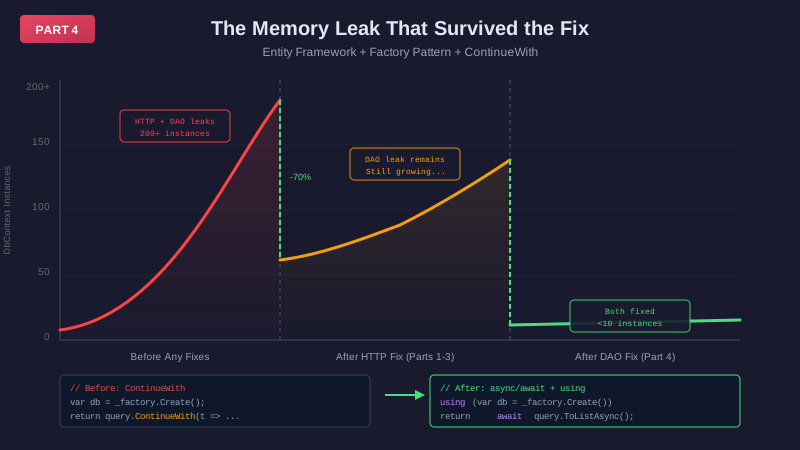
I fixed the HTTP disposal leaks. Deployed. Watched the profiler. Memory dropped 70%. Victory.
Then the 499s came back.
The Leak After the Leak
If you've been following this series, you know the story. Our high-volume API had been throwing intermittent timeout errors for two years. In Part 1, I found five missing using statements in our HTTP layer. In Part 3, we migrated 200+ controllers from HttpResponseMessage to IHttpActionResult.
Memory growth dropped 70%. GC thrashing stopped. We thought we were done.
We were wrong.
Under sustained load, the 499 errors crept back. Not as aggressive as before — the HTTP fixes were real — but still there. Something else was leaking.
So I went back to the profiler. And this time, the retention graph showed something different.
200+ DbConnectionPool instances. In memory. All at once.
That's not connection pooling. That's a leak.
The Code Everyone Trusted
The retention path led to ContinueWith continuations in our data access layer. Every DAO method followed this pattern:
public Task<IList<AppConfiguration>> GetById(string id)
{
    var db = _dbContextFactory.Create();
    var query = db.Configurations.Where(a => a.Id == id);

    return query.ToListAsync().ContinueWith<IList<AppConfiguration>>(t =>
    {
        var result = t.Result;
        db.Dispose();  // ⚠️ Disposal happens... eventually
        return result;
    }, TaskContinuationOptions.ExecuteSynchronously);
}
Looks reasonable, right? Create a context from the factory, run the query, dispose in the continuation. Ship it.
We shipped it everywhere. This pattern was in our base DAO class. Every service. Every database query. For years.
Nobody questioned it because we were "using a factory," and factories manage lifecycles. That's the whole point.
Except they don't.
What the Factory Actually Does
Here's the misconception that cost us:
"We're using a factory pattern, so the factory manages the lifecycle."
Wrong. The factory's job ends at .Create(). After that, the caller owns the object. Always has.
Think about it: new SqlConnection(connectionString) doesn't dispose itself. Neither does _dbContextFactory.Create(). The factory is a constructor with a nicer API. Disposal is still your problem.
Why ContinueWith Makes It Worse
The ContinueWith pattern creates a subtle lifecycle issue. Let's trace what actually happens:
Normal Operation (No Exception)
Time 0ms:   Method called → DbContext created
Time 1ms:   ToListAsync() starts
Time 1ms:   Method returns Task (DbContext captured in closure)
Time 50ms:  ToListAsync() completes
Time 51ms:  ContinueWith executes → db.Dispose() called
Time 52ms:  Closure eligible for GC
Time ???:   GC runs (maybe seconds, maybe minutes)
Time ???:   DbContext finally collected

DbContext lifetime: 50ms + continuation + GC delay
At 40 requests per second with 50ms queries, you've got contexts piling up by design. Not because of errors. Because of how closures work.
Under Load
200 requests hit simultaneously. Each creates a DbContext. Each one lives until:
- Its specific query completes
- Its specific continuation runs
- The garbage collector eventually gets around to it
That's your 200+ instances.
When Exceptions Happen
If ToListAsync() throws, the continuation still runs — but it calls t.Result, which rethrows the exception. Depending on how TaskContinuationOptions interacts with the exception, db.Dispose() may or may not execute. In practice, exception scenarios made the leak worse.
But honestly? The exception case isn't the main problem. The leak happens during normal operation.
The Connection Pool Death Spiral
Here's why this causes 499 errors:
At low traffic (10-20 req/sec): Contexts dispose fast enough. You don't notice.
At moderate traffic (50-100 req/sec): Contexts accumulate. The database connection pool gets stressed. Some requests start timing out.
At high traffic (200+ req/sec): Connection pool exhaustion. New requests can't get connections. They timeout before they even start. HTTP 499.
But here's the sneaky part — you don't need high traffic. You just need:
- One slow query (3 seconds instead of 50ms)
- One report endpoint that hits the DAO 50 times
- One user refreshing a dashboard repeatedly
- Gradual accumulation over hours of steady load
This explained why the 499s were intermittent. They didn't correlate cleanly with traffic spikes because the trigger wasn't traffic — it was accumulation.
The Fix
public async Task<IList<AppConfiguration>> GetById(string id)
{
    using (var db = _dbContextFactory.Create())
    {
        return await db.Configurations
            .Where(a => a.Id == id)
            .ToListAsync();
    }  // ← Disposed IMMEDIATELY after query completes
}
What Changed
- Added
async— method properly suspends and resumes - Added
await— execution waits for query completion - Added
using— guarantees disposal even on exceptions - Removed
ContinueWith— no closure capture, no heap allocation
New Lifecycle
Time 0ms:   Method called → DbContext created
Time 1ms:   await ToListAsync() — execution suspends
Time 50ms:  Query completes — execution resumes
Time 51ms:  using block exits → db.Dispose() called IMMEDIATELY
Time 51ms:  Method returns result

DbContext lifetime: 51ms. Every time. Predictably.
From "50ms + continuation + GC delay" to "51ms flat."
The Scope of the Problem
This wasn't a one-off. The ContinueWith pattern was baked into our base DAO class. That meant:
- Every DAO method in every service had this bug
- Every database query potentially leaked its context
- Multiply across all services under load
- Two years of intermittent connection exhaustion
- Significant infrastructure over-provisioning to compensate
- Countless hours debugging "database performance problems" that weren't database problems at all
We were throwing hardware at a software problem.
The Golden Rule We Missed
If it implements IDisposable, wrap it in using. Period.
We thought the factory pattern somehow exempted us from this. It doesn't. The factory creates instances. You dispose them. Same rule from Part 2 — just wearing a different hat.
The only exception: if you're intentionally returning the disposable to the caller, they become responsible for the using. But if you create it, use it, and extract data from it — the using wraps the whole operation.
DAOs return data, not queryables. The context should never outlive the method that created it.
How to Find This in Your Code
Search for these patterns:
\.ToListAsync\(\)\.ContinueWith
\.FirstOrDefaultAsync\(\)\.ContinueWith
\.SingleOrDefaultAsync\(\)\.ContinueWith
_dbContextFactory\.Create\(\)
If you find ContinueWith being used for disposal of anything IDisposable, you've got the same leak. The async/await + using replacement is straightforward and mechanical — no architectural changes required.
The Results
After deploying the DAO fixes alongside the HTTP fixes from Parts 1-3:
Load test (60 seconds, 100+ req/sec):
DbConnectionPool instances:  200+ → <10 ✅
Connection pool exhaustion:  Frequent → None ✅
499 errors:                  Intermittent → 0 ✅
Memory growth:               Exponential → Linear (stable)
In production:
- The intermittent 499 errors that survived the HTTP fix — gone
- Connection pool metrics went from a sawtooth pattern to a flat line
- We reduced our database server tier without any performance impact
Two separate leaks. Same root cause. Same fix. One using statement at a time.
The Lesson
The HTTP disposal leaks in Parts 1-3 were dramatic — millions of objects, GC thrashing, clear profiler evidence. This one was quieter. It didn't spike memory as visibly. It just slowly starved the connection pool until something tipped.
Sometimes the biggest bugs hide in patterns you trust. We trusted the factory pattern. We trusted ContinueWith because it "looked safe." We trusted that someone, somewhere, had thought through the lifecycle management.
They hadn't. We hadn't. Nobody had.
Two years of 499 errors. Two separate leaks. Both solved by understanding what IDisposable actually means.
If you're using Entity Framework (or any IDisposable pattern) with factories, go check your disposal strategy. Seriously. Stop reading this and go look.
I'll wait.
Series recap:
- Part 1: The two-year investigation — finding 5 missing
usingstatements - Part 2: IDisposable fundamentals — what I misunderstood for 30 years
- Part 3: Web API disposal —
HttpResponseMessagevsIHttpActionResult - Part 4: Entity Framework factory disposal (you are here)
- ELI5: Why programs forget to clean up — explained with restaurants
Tools used:
- dotMemory (memory profiling)
- Visual Studio Diagnostic Tools (snapshot comparison)
- Retention graph analysis for tracking object roots
Co-Authored-By: Claude Opus 4.6 [email protected]