Returning the "wrong" type from your Web API controllers is probably leaking memory right now.
The Silent Killer
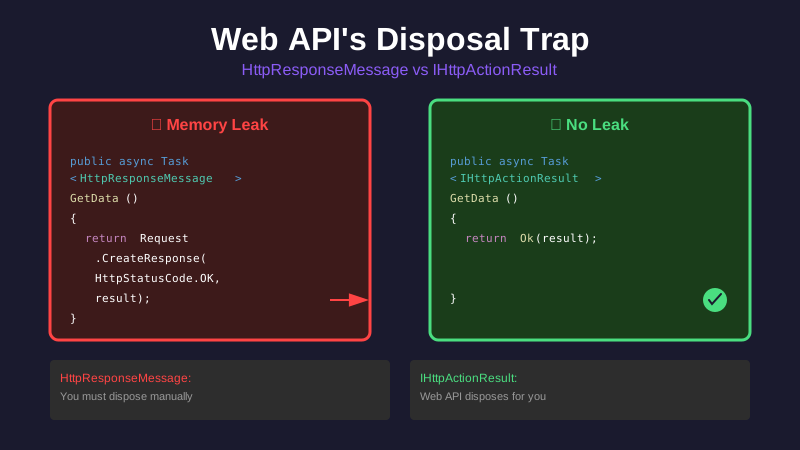
Pop quiz: Which of these Web API controller methods leaks memory?
// Method A
public async Task<HttpResponseMessage> GetData()
{
    var result = await _service.GetData();
    return Request.CreateResponse(HttpStatusCode.OK, result);
}

// Method B
public async Task<IHttpActionResult> GetData()
{
    var result = await _service.GetData();
    return Ok(result);
}
Answer: Method A leaks. Badly.
In our production codebase, we had hundreds of controllers following the Method A pattern. Every single one was leaking HttpResponseMessage objects — 2,257 of them piling up in memory under load.
The Problem: Web API's Disposal Contract
ASP.NET Web API has different disposal contracts depending on what you return:
Return Type: IHttpActionResult
public async Task<IHttpActionResult> GetData()
{
    return Ok(result);
}
Who disposes it: Web API framework When: After the response is sent Your responsibility: None ✅
Return Type: HttpResponseMessage
public async Task<HttpResponseMessage> GetData()
{
    return Request.CreateResponse(HttpStatusCode.OK, result);
}
Who disposes it: You (the developer)
When: Explicitly via using statement
Your responsibility: Everything ⚠️
The catch: This isn't documented clearly, and most developers don't know about it.
What We Were Doing (Wrong)
Here's a real pattern from our codebase:
[HttpGet]
[Route("{id}")]
public async Task<HttpResponseMessage> GetItem([FromUri] string id)
{
    var result = await _service.GetItem(id);

    return Request.CreateResponse(HttpStatusCode.OK, result);
    // ❌ Created but never disposed
    // ❌ Web API doesn't dispose HttpResponseMessage returns
    // ❌ Leaks on every single request
}
Another example with custom headers:
[HttpGet]
[Route("details/{id}")]
public async Task<HttpResponseMessage> GetDetails([FromUri] string id)
{
    var result = await _service.GetDetails(id);

    var response = Request.CreateResponse(HttpStatusCode.OK, result);
    response.Headers.Add("X-Custom-Header", "value");

    return response;
    // ❌ Even more work done, still never disposed
}
Every controller. Every action. Every request. Leaking.
Under load (100+ req/sec), these objects piled up:
- 2,257
HttpResponseMessageinstances in memory - Holding references to their content
- Preventing garbage collection
- Causing GC thrashing
Why This Happens
When you return HttpResponseMessage, Web API:
- ✅ Serializes the content to the response stream
- ✅ Sends the HTTP response to the client
- ❌ Does NOT call
Dispose()on your HttpResponseMessage
Web API assumes you own it because you created it explicitly.
When you return IHttpActionResult, Web API:
- Calls
ExecuteAsync()on the action result - Gets an
HttpResponseMessagefrom it - Serializes and sends the response
- ✅ Calls
Dispose()on the HttpResponseMessage - ✅ Cleans up everything
Web API assumes it owns it because the framework created it.
The Fix: Three Patterns
Pattern 1: Use Built-in IHttpActionResult Helpers (Best)
// BEFORE:
public async Task<HttpResponseMessage> GetData()
{
    var result = await _service.GetData();
    return Request.CreateResponse(HttpStatusCode.OK, result);
}

// AFTER:
public async Task<IHttpActionResult> GetData()
{
    var result = await _service.GetData();
    return Ok(result);
    // ✅ Web API handles everything
}
Built-in helpers:
return Ok(data);                         // 200 OK
return Created(location, data);          // 201 Created
return BadRequest();                     // 400 Bad Request
return NotFound();                       // 404 Not Found
return InternalServerError();            // 500 Internal Server Error
return StatusCode(HttpStatusCode.Accepted);  // Any status code
Pattern 2: Use ResponseMessage() for Custom Headers
// BEFORE:
public async Task<HttpResponseMessage> GetDetails([FromUri] string id)
{
    var result = await _service.GetDetails(id);

    var response = Request.CreateResponse(HttpStatusCode.OK, result);
    response.Headers.Add("X-Warning", "deprecated");

    return response;
    // ❌ Never disposed
}

// AFTER:
public async Task<IHttpActionResult> GetDetails([FromUri] string id)
{
    var result = await _service.GetDetails(id);

    var response = Request.CreateResponse(HttpStatusCode.OK, result);
    response.Headers.Add("X-Warning", "deprecated");

    return ResponseMessage(response);
    // ✅ Web API disposes it
}
Critical: Don't wrap in using! The ResponseMessage() helper takes ownership and Web API will dispose it.
// WRONG - disposes before returning!
using (var response = Request.CreateResponse(HttpStatusCode.OK, result))
{
    return ResponseMessage(response);
} // ❌ Disposed here, then ResponseMessage tries to use it

// CORRECT - let ResponseMessage handle disposal
var response = Request.CreateResponse(HttpStatusCode.OK, result);
return ResponseMessage(response);
// ✅ ResponseMessage takes ownership
Pattern 3: Add Headers via HttpContext (Cleanest)
For simple header additions, skip HttpResponseMessage entirely:
public async Task<IHttpActionResult> GetDetails([FromUri] string id)
{
    var result = await _service.GetDetails(id);

    // Add headers directly to HTTP response
    System.Web.HttpContext.Current.Response.AddHeader("X-Warning", "deprecated");

    return Ok(result);
    // ✅ Simple, clean, no disposal needed
}
Our Migration
We had over 200 controller actions to fix.
Step 1: Categorize
Simple (65%): Just return data
// Easy fix: Change to Ok()
return Request.CreateResponse(HttpStatusCode.OK, result);
// Becomes:
return Ok(result);
Medium (30%): Custom headers or status codes
// Use ResponseMessage()
var response = Request.CreateResponse(HttpStatusCode.Accepted);
response.Headers.Add("X-Custom", "value");
return ResponseMessage(response);
Complex (5%): Custom response processing
// Refactor to helper or use ResponseMessage()
var response = Request.CreateResponse(HttpStatusCode.OK, result);
response.Content = ProcessContent(result);
return ResponseMessage(response);
Step 2: Update Tests
Every test that checked response.StatusCode needed updating:
// BEFORE:
[Fact]
public async Task GetData_ReturnsOk()
{
    var response = await _controller.GetData();

    Assert.Equal(HttpStatusCode.OK, response.StatusCode);
}

// AFTER (Option 1 - Execute the action result):
[Fact]
public async Task GetData_ReturnsOk()
{
    var actionResult = await _controller.GetData();
    var response = await actionResult.ExecuteAsync(CancellationToken.None);

    Assert.Equal(HttpStatusCode.OK, response.StatusCode);

    response.Dispose(); // ✅ Clean up in test
}

// AFTER (Option 2 - Test the action result type):
[Fact]
public async Task GetData_ReturnsOk()
{
    var result = await _controller.GetData();

    Assert.IsType<OkNegotiatedContentResult<DataModel>>(result);
    // ✅ No need to execute or dispose
}
Step 3: Phased Deployment
We couldn't fix all 203 actions at once:
- Week 1: Simple cases (65% of controllers)
- Week 2: Medium cases (30% of controllers)
- Week 3: Complex cases (5% of controllers)
- Week 4: Monitor production
After each deployment, we verified:
- Memory growth? (should be stable)
HttpResponseMessagecount? (should stay < 100)- GC pressure? (should be minimal)
Real-World Impact
Before the Fix
Load test (60 seconds, 100+ req/sec):
Objects:              194k → 5.5M (28x growth)
HttpResponseMessage:  2,257 instances
Memory:               9.5 MB → 208 MB
GC time:              0% → 8% (thrashing)
499 errors:           1,373 failed requests
After the Fix
Same test:
Objects:              189k → 2.7M (slower growth)
HttpResponseMessage:  < 100 instances ✅
Memory:               9.5 MB → 115 MB (stable)
GC time:              0%
499 errors:           0 ✅
Production results:
- Before: Frequent timeout errors during peak hours
- After: Zero timeouts, stable performance
- Infrastructure: 12 instances → 6 instances (50% cost reduction)
Common Pitfalls
Pitfall 1: Mixing Patterns
// INCONSISTENT
public class MyController : ApiController
{
    public async Task<IHttpActionResult> Action1() { ... }      // ✅ Good
    public async Task<HttpResponseMessage> Action2() { ... }    // ❌ Leaks
    public async Task<IHttpActionResult> Action3() { ... }      // ✅ Good
}
Solution: Pick one pattern and stick with it.
Pitfall 2: Wrapping ResponseMessage in Using
// WRONG
using (var response = Request.CreateResponse(HttpStatusCode.OK, result))
{
    return ResponseMessage(response);
} // ❌ ObjectDisposedException when Web API sends response
Pitfall 3: Forgetting to Update Tests
Tests break when you change return types. Plan for test updates.
The Decision Matrix
| Scenario | Pattern | Example |
|---|---|---|
| Simple success | Ok(data) |
return Ok(user); |
| Simple error | Built-in helper | return NotFound(); |
| Custom status | StatusCode() |
return StatusCode(HttpStatusCode.Accepted); |
| Custom headers | ResponseMessage() |
return ResponseMessage(response); |
Key Takeaways
HttpResponseMessagereturns leak - You must dispose manuallyIHttpActionResultis safe - Web API handles disposal- Use
Ok()when possible - Simplest and safest - Use
ResponseMessage()for headers - Don't wrap inusing - Update tests - Use
ExecuteAsync()or test result type - Load test to verify - Memory should stay stable
The Irony
This pattern came from official Microsoft documentation. The examples showed Task<HttpResponseMessage> everywhere. The docs didn't mention disposal requirements.
No wonder we got it wrong.
Series recap:
- Part 1: The two-year investigation
- Part 2: IDisposable fundamentals
- Part 3: Web API disposal patterns (you are here)
- Part 4: Entity Framework factory disposal
- ELI5: Why programs forget to clean up
Resources:
Tags: aspnet, web-api, memory-leak, ihttpactionresult, best-practices, performance