The Problem That Wouldn't Die
Our high-volume API started throwing timeout errors under load. Not always. Just when traffic spiked above 100 requests per second.
The timeline was brutal:
- Month 1: Occasional 499 timeouts during peak hours
- Month 6: Weekly production incidents
- Month 12: External consultants brought in to review our code
- Month 18: Infrastructure upgrades (more RAM, more servers)
- Month 24: Still happening
The consultants reviewed our code. "Looks fine," they said. The logic was sound. The patterns were correct. We threw more hardware at it. The problem persisted.
Then one Friday afternoon, my boss casually mentioned in our team meeting that he was "super excited" about some diagnostics I'd been running. I hadn't even told him I'd found the solution yet.
That weekend, I found all five memory leaks. By Monday, the fix was deployed.
Two years of production pain. Five using statements.
The Symptoms
Every load test showed the same pattern. Around the 2-3 minute mark:
- OK requests drop to zero
- Failed requests spike dramatically
- Latency climbs from ~100ms to 60,000ms, then drops sharply (everything timing out)
- HTTP connection count grows to 500+
- GC starts thrashing (0% → 8% time-in-gc)
Classic memory exhaustion. But where was the leak?
The Investigation
I attached Visual Studio's diagnostic tools to a local instance and ran a load test against localhost. What I saw shocked me.
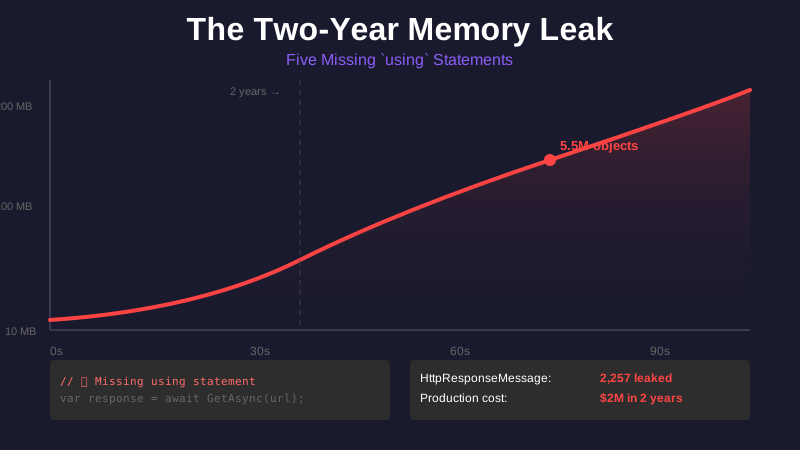
Memory snapshots over 30 seconds:
| Snapshot | Time | Objects | Heap Size |
|---|---|---|---|
| 1 | 240s | 194,071 | 9.5 MB |
| 2 | 255s | 1,428,678 | 68.4 MB |
| 3 | 262s | 2,847,291 | 135.2 MB |
| 4 | 269s | 5,539,099 | 208.9 MB |
In 30 seconds, we went from 194,000 objects to 5.5 MILLION objects.
Drilling into the object types:
HttpContext:        285,590 instances (should be < 100)
HttpRequestMessage:   2,289 instances
HttpResponseMessage:  2,257 instances
The "Paths to Root" view showed these objects were all held by RootedObjects [Strong Handle] — meaning they weren't being garbage collected because something was still referencing them.
The Five Leaks
Every leak followed the same pattern: IDisposable objects created but never disposed.
Leak #1: HTTP Request/Response in Service Layer
private async Task<string> GetAccessToken()
{
    var request = await BuildHttpRequest(HttpMethod.Post, tokenUrl);
    var response = await ExecuteHttpRequestAsync(request, cancellationToken);

    return ExtractTokenValue(response);
    // ❌ Neither request nor response are ever disposed!
}
This leaked every time an access token was refreshed (every few minutes).
Leak #2: Error Response Parsing
Every error handler called a method that read the response content but never disposed the response:
private async Task<ErrorModel> ParseErrorResponse(HttpResponseMessage response)
{
    var content = await response.Content.ReadAsStringAsync();
    return JsonConvert.DeserializeObject<ErrorModel>(content);
    // ❌ Response never disposed - leaks on EVERY error
}
Leak #3: Base Class HTTP Methods
Our common HTTP library had methods that created requests but never cleaned them up:
protected internal async Task<HttpResponseMessage> GetAsync(string url)
{
    var request = await BuildHttpRequest(HttpMethod.Get, url);
    return await ExecuteHttpRequestAsync(request, cancellationToken);
    // ❌ Request never disposed
    // ❌ Response returned without disposal guidance
}
This affected EVERY HTTP request across all our services.
Leak #4: Web API Controllers
Every controller endpoint:
public async Task<HttpResponseMessage> GetData(string id)
{
    var result = await _service.GetData(id);
    return Request.CreateResponse(HttpStatusCode.OK, result);
    // ❌ Response never disposed by Web API or calling code
}
More on this in Part 3.
Leak #5: Content Reading Without Disposal
protected async Task<T> ExecuteHttpRequestAsync<T>(HttpRequestMessage request)
{
    var client = _httpClientFactory.Get();
    var response = await client.SendAsync(request, cancellationToken);

    return await response.Content.ReadAsAsync<T>(cancellationToken);
    // ❌ Response object abandoned after reading content
}
Why the Consultants Missed This
Their code review was static analysis only. No load testing. They looked at:
- ✅ Business logic (correct)
- ✅ Error handling (present)
- ✅ Async/await patterns (proper)
- ❌ Object lifecycle management (not checked)
- ❌ Disposal patterns (not verified)
- ❌ Load testing (not performed)
The leaks only manifest under concurrent high load. At low volume (1-10 req/sec), the GC keeps up. At high volume (100+ req/sec), objects pile up faster than GC can collect them.
The Fixes (High-Level)
The solution was straightforward once I understood the problem:
Wrap everything IDisposable in using statements.
// BEFORE:
private async Task<string> GetAccessToken()
{
    var request = await BuildHttpRequest(...);
    var response = await ExecuteHttpRequestAsync(request, ...);
    return ExtractTokenValue(response);
}

// AFTER:
private async Task<string> GetAccessToken()
{
    using (var request = await BuildHttpRequest(...))
    using (var response = await ExecuteHttpRequestAsync(request, ...))
    {
        return ExtractTokenValue(response);
    }
}
For methods that return responses, we changed the controller return types (more on this in Part 3).
The Results
Before fixes (60-second load test at 100+ req/sec):
Objects:     194k → 5.5M
Memory:      9.5 MB → 208 MB
GC pressure: 0% → 8% (thrashing)
499 errors:  1,373 requests failed
After fixes (same test):
Objects:     189k → 2.7M (slower growth)
Memory:      9.5 MB → 115 MB (stable)
GC pressure: 0% (no thrashing)
499 errors:  0 ✅
Production impact:
- Before: Frequent timeout errors during peak hours
- After: Zero timeouts, stable performance
- Infrastructure: Reduced from 12 instances to 6 instances for same load
- Cost savings: ~50% reduction in infrastructure costs
The Monday Morning Victory
That Monday, I showed my boss the before/after profiler screenshots. Stable memory. No 499s. He was stunned.
"How did you find this?"
"Load testing showed the symptoms. Visual Studio showed the objects. The code showed the pattern. Five missing using statements across the codebase."
Two years of production pain. Five using statements.
What I Learned
After 30 years of C# development, I finally understood something fundamental:
Objects don't dispose themselves when they go out of scope.
I thought they did. So did most of the developers I know. It's one of the most common misconceptions in C#, and it nearly cost us millions in infrastructure and lost customers.
In Part 2, I'll explain the fundamental concept I misunderstood for three decades — and why C# works this way.
In Part 3, I'll show the specific Web API pattern that leaked in every single controller we had.
In Part 4, I'll find the second leak — the one that survived the HTTP fix — hiding in our Entity Framework factory pattern.
Tools used:
- NBomber (load testing framework)
- Visual Studio Diagnostic Tools (memory profiling)
- Snapshot comparison at 1min intervals
Tags: csharp, dotnet, memory-leak, debugging, performance, production