"The process cannot access the file because it is being used by another process."
If you've seen this error during a .NET build, you've probably blamed your antivirus, your IDE, or your luck. But there's a quieter culprit that's easy to overlook: VS Code's file watcher.
The Symptom
You're building a .NET project. Sometimes it works. Sometimes it fails with:
error MSB3027: Could not copy "obj\Debug\net8.0\MyProject.dll" to "bin\Debug\net8.0\MyProject.dll".
Exceeded retry count of 10. Failed.
The file is locked by: "Code.exe (12345)"
The giveaway is Code.exe in the lock message. That's VS Code.
The Cause
VS Code watches files for changes—it's how features like Explorer auto-refresh and extensions like OmniSharp work. By default, it watches everything in your workspace.
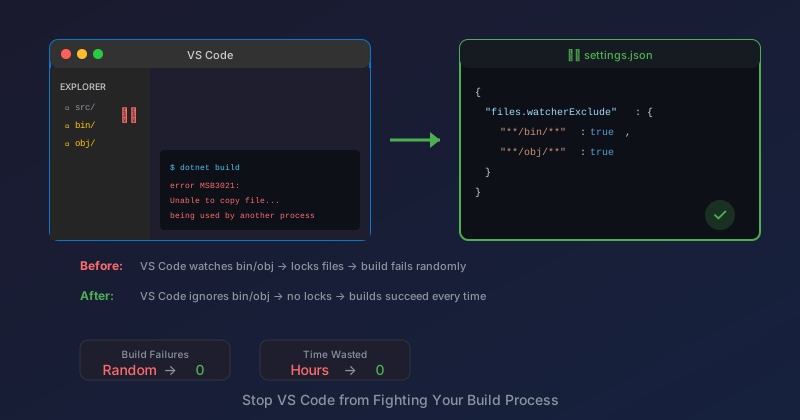
When MSBuild writes to bin/ or obj/, VS Code's file watcher notices the change and briefly holds a handle to the file. If MSBuild tries to write again (like during the copy step), it can't—the file is locked.
This is a race condition. Sometimes VS Code releases the handle before MSBuild needs it. Sometimes it doesn't. That's why the build is flaky.
The Fix
Tell VS Code to ignore build output folders:
// .vscode/settings.json
{
    "files.watcherExclude": {
        "**/bin/**": true,
        "**/obj/**": true
    }
}
This removes bin/ and obj/ from VS Code's file watcher. Changes in those folders won't trigger Explorer refreshes or extension reactions—but you don't need those folders watched anyway.
But I Already Have files.exclude
files.exclude and files.watcherExclude are different:
| Setting | Effect |
|---|---|
files.exclude |
Hides files from Explorer view |
files.watcherExclude |
Stops watching files for changes |
You might already have:
{
    "files.exclude": {
        "**/bin": true,
        "**/obj": true
    }
}
This hides the folders from the Explorer sidebar, but VS Code still watches them for changes. Both settings are needed:
{
    "files.exclude": {
        "**/bin": true,
        "**/obj": true
    },
    "files.watcherExclude": {
        "**/bin/**": true,
        "**/obj/**": true
    }
}
Note the /** suffix in watcherExclude—it matches all files within the folder, not just the folder itself.
Why This Is Easy to Miss
The build failure is intermittent. Sometimes it works, sometimes it doesn't. This makes it hard to correlate with VS Code being open.
And the error message says "used by another process"—it doesn't say "VS Code is watching this file and that's causing a race condition." You'd have to use a tool like Process Explorer or handle.exe to see that Code.exe holds the lock.
Other Folders to Exclude
If you're using other tools that generate output, consider excluding those too:
{
    "files.watcherExclude": {
        "**/bin/**": true,
        "**/obj/**": true,
        "**/node_modules/**": true,
        "**/.git/objects/**": true,
        "**/packages/**": true,
        "**/TestResults/**": true
    }
}
The node_modules and .git/objects exclusions are particularly helpful for large repositories—they reduce CPU usage from watching thousands of files you don't care about.
Project-Level vs. User-Level
You can set this at the project level (.vscode/settings.json) or the user level (global VS Code settings). Project-level is usually better because:
- It's committed to source control
- It applies to everyone working on the project
- You can customize per-project if needed
Verifying It Works
After adding the exclusions, restart VS Code (or reload the window with Ctrl+Shift+P → "Reload Window"). Then try building a few times:
dotnet clean && dotnet build && dotnet build && dotnet build
If the lock issue was caused by file watching, this should now succeed consistently.
Alternative: Close VS Code
The nuclear option is to close VS Code while building. This definitely works—but it defeats the purpose of having an IDE open while developing.
If you find yourself closing VS Code to build, you have a file watcher problem. Fix the root cause instead.
The MAUI Twist
MAUI Android builds are particularly susceptible because they generate a lot of intermediate files. The obj/ folder can have thousands of files during a build. That's thousands of opportunities for a file watcher race condition.
If you're doing MAUI development and hitting intermittent build failures, check your file watcher exclusions first.
Key Takeaways
files.watcherExcludeis different fromfiles.exclude— You need both- Exclude
bin/**andobj/**— Always, for any .NET project - The symptom is intermittent — Makes it hard to diagnose
- Check the lock owner — Process Explorer or
handle.exereveals VS Code - Project-level settings are better — Commit them for the whole team
The One-Liner
Add this to every .NET project's .vscode/settings.json:
{
    "files.watcherExclude": {
        "**/bin/**": true,
        "**/obj/**": true
    }
}
Two lines of JSON. No more mystery build failures.
The worst bugs are the intermittent ones. This one took me months to figure out because the build usually worked, and when it didn't, I just ran it again. Don't be like past-me. Fix it properly.
Related Posts
- MAUI Fast Deployment and Wireless Debugging — Another developer experience gotcha with .NET builds
- Mobile CSS Micro-Fixes — More small fixes that make a big difference