You've seen the little padlock icon in your browser's address bar. You might have noticed some websites start with "https://" while sketchy ones sometimes don't. Your browser might even warn you about "insecure" connections.
But what does any of it actually mean? What's being locked? Safe from what?
This post explains HTTPS, SSL certificates, and web security—using nothing but analogies and common sense. No code. No jargon. Just understanding.
The Problem: Postcards on the Internet
Imagine you're sending a letter through the mail. You write your credit card number on a postcard and drop it in the mailbox.
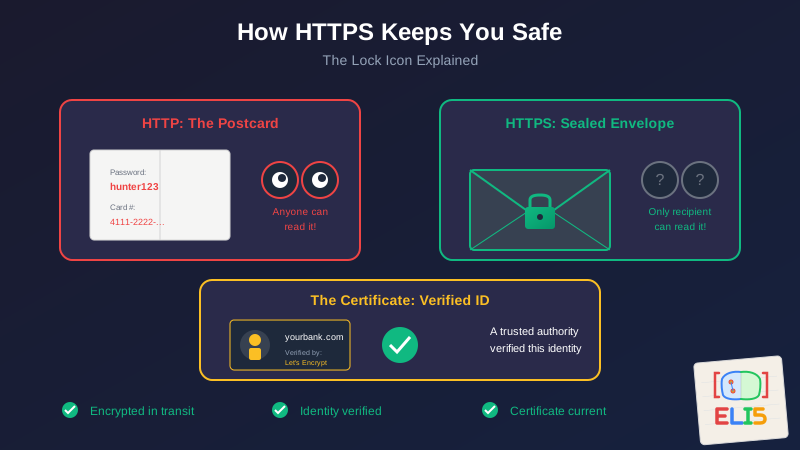
That postcard passes through dozens of hands. The mail carrier. The sorting facility. The truck driver. Another sorting facility. Another carrier. Any of them could read it. Copy it. The postcard is completely open.
That's how the early internet worked. When you typed your password into a website, it traveled across the internet as plain text—readable by anyone who happened to be watching. Your internet provider. The coffee shop's WiFi. Hackers sitting in the middle.
HTTP (without the S) is the postcard. Anyone in the chain can read it.
The Solution: Sealed Envelopes
HTTPS is the sealed envelope.
When you connect to a website using HTTPS, your browser and the website agree on a secret code. Everything you send gets encrypted (scrambled) before it leaves your computer. It travels across the internet as gibberish. Only the website can unscramble it.
Even if someone intercepts your data in transit, all they see is noise. Your password, your credit card, your messages—all locked in an envelope that only the intended recipient can open.
This is encryption. It's the "S" in HTTPS (the S stands for "Secure").
But How Do You Know Who You're Talking To?
Encryption solves one problem: eavesdropping. But it creates another: how do you know you're actually talking to your bank, and not someone pretending to be your bank?
Imagine someone intercepts your mail, sets up a fake bank address, and sends you fake statements. The letters are still sealed. But you're corresponding with a criminal.
This is where certificates come in.
An SSL certificate is like a notarized ID card for websites. It says: "I am wellsfargo.com, and a trusted authority has verified my identity."
But who's the trusted authority?
Certificate Authorities: The Notaries of the Internet
In the real world, we have notaries—people authorized to verify identities and make documents official. On the internet, we have Certificate Authorities (CAs).
Certificate Authorities are companies (or organizations) that:
- Verify that someone actually owns a domain name
- Issue certificates that browsers trust
- Maintain a reputation that depends on never making mistakes
When you visit a website, your browser checks the certificate against a list of trusted Certificate Authorities. If the certificate is valid and the authority is trusted, you see the padlock. If something's wrong—the certificate expired, doesn't match the domain, or was issued by someone sketchy—you see a warning.
Your browser comes pre-loaded with a list of about 100-150 trusted CAs. It's like having a list of approved notaries in your pocket.
Let's Encrypt: Free Notarization for Everyone
For years, certificates cost money. Sometimes hundreds of dollars per year. This meant small websites often couldn't afford HTTPS, which meant the internet was less safe for everyone.
In 2015, a nonprofit called Let's Encrypt changed everything by offering free certificates to anyone. They automated the verification process: if you can prove you control a domain (by placing a specific file on your server or adding a specific DNS record), they'll issue you a certificate.
Now there's no excuse. Every website can be secure.
This is what I use for my sites. A little computer (a Raspberry Pi, actually) automatically renews my certificates every 90 days. I haven't thought about certificate expiration in years.
The Certificate Dance (Simplified)
When you visit an HTTPS website, your browser and the server perform a quick handshake:
Your browser says: "Hi, I want to connect securely. Here are the encryption methods I support."
The server says: "Great, let's use this method. Here's my certificate—it proves I'm who I say I am."
Your browser checks: "Is this certificate valid? Is it issued by someone I trust? Does the name match the website I'm visiting?"
If everything checks out: They agree on a secret key that only the two of them know.
From now on: Everything between you and the server is encrypted with that key.
This whole dance happens in milliseconds. By the time the page loads, you're secure.
What the Padlock Actually Means
Here's what the padlock tells you:
✅ Your connection is encrypted. Nobody can eavesdrop on what you're sending or receiving.
✅ The website's identity was verified. A Certificate Authority confirmed the domain ownership.
✅ The certificate is current. It hasn't expired or been revoked.
Here's what the padlock does NOT tell you:
❌ The website is trustworthy. Scam sites can have certificates too.
❌ The website is safe to buy from. HTTPS means the connection is secure, not that the business is legitimate.
❌ Your data is safe forever. The website might still store your data badly after receiving it.
The padlock means "the envelope is sealed." It doesn't mean "the person you're mailing to is honest."
Why Some Warnings Are Scary
When your browser shows a big scary warning about a certificate, it's usually one of these:
"Certificate expired" — The website's ID card is out of date. This might just be laziness (someone forgot to renew), but it could also mean the site is abandoned or compromised.
"Certificate doesn't match" — The certificate says "example.com" but you're visiting "secure.example.com". This could be a misconfiguration or an attack.
"Issuer not trusted" — The certificate was issued by a CA that your browser doesn't recognize. Maybe legitimate, but proceed with caution.
"Connection not secure" — The site doesn't use HTTPS at all. Fine for reading recipes, bad for entering passwords.
The Simple Takeaway
HTTPS is the postal service learning to seal envelopes and verify identities.
- HTTP = Postcard. Anyone can read it.
- HTTPS = Sealed envelope with verified return address.
- Certificate = Notarized ID proving the website is who it claims.
- Certificate Authority = The trusted notary who verified the ID.
- Let's Encrypt = Free notarization for everyone.
When you see the padlock, you know two things: your data is encrypted in transit, and someone verified the website's identity. That's the foundation that makes online banking, shopping, and private communication possible.
It's not magic. It's math and trust infrastructure. But the result is pretty magical: billions of private conversations happening across public networks, every second, completely unreadable to anyone in between.
This is part of the ELI5 series—technical concepts explained without the jargon. For the technical implementation of SSL automation, see SSL Automation with Let's Encrypt and Cloudflare and Upgrading Certbot to Wildcard Certificates.
The best security is invisible. When everything works, you just see a little padlock and go about your day.