You type a question into ChatGPT. A few seconds later, it responds with something that sounds intelligent, helpful, even creative. Where does that answer come from? Is it thinking? Is it searching the internet? Is it pulling from a database of pre-written responses?
The reality is stranger—and more interesting—than any of those.
This post explains how large language models work, what they're actually doing when they respond, and why understanding the mechanism helps you use them better. No math required. No computer science degree. Just analogies.
The Autocomplete on Steroids
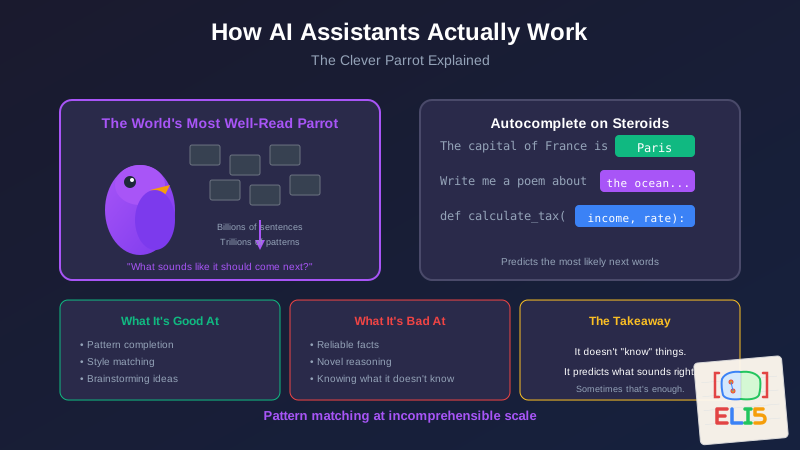
You know how your phone suggests the next word when you're texting? Type "I'm on my" and it might suggest "way." That's autocomplete—predicting the next word based on patterns in language.
An AI assistant is that, but scaled up dramatically.
Instead of predicting one word based on the previous few, it predicts the next word based on everything in the conversation, weighted by patterns it learned from essentially the entire written internet.
Type "The capital of France is" and it predicts "Paris" because that sequence appears countless times in its training. Not because it "knows" geography—because statistically, that's what comes next.
This is the core insight: AI assistants are prediction engines. They predict what text should come next, one word at a time, based on patterns.
The World's Most Well-Read Parrot
Here's an analogy that helps me think about it:
Imagine a parrot that has listened to every book, article, forum post, and webpage ever written. Billions of sentences. Trillions of patterns. This parrot doesn't understand any of it—but it has an incredible ear for how language flows.
When you say something to the parrot, it doesn't think: "What's the answer to this question?" It thinks: "Based on everything I've heard, what sounds like it should come next?"
If you ask about history, it produces text that sounds like history writing. If you ask for code, it produces text that sounds like code. If you ask for a poem, it shifts to patterns that sound poetic.
The parrot isn't reasoning. It's pattern-matching at an almost incomprehensible scale.
This is why AI can be confidently wrong. It's not lying—it's predicting what sounds correct based on patterns. Sometimes patterns lead to truth. Sometimes they lead to plausible-sounding nonsense.
Training: Teaching the Parrot
So how does the parrot learn all these patterns?
Training is the process of showing the AI enormous amounts of text and letting it find patterns. The AI reads a sentence like "The cat sat on the ___" and tries to guess "mat." If it guesses wrong, it adjusts its internal weights slightly. Do this billions of times with billions of sentences, and the AI becomes very good at predicting next words.
But that's just the first step.
Raw prediction creates an AI that can complete sentences but isn't great at having conversations. The second phase is fine-tuning, where humans rate different responses. "This answer was helpful." "This answer was unclear." "This answer was harmful." The AI learns not just what's statistically likely, but what humans find useful.
This is why modern AI assistants are remarkably good at following instructions, staying on topic, and being helpful—they've been trained on millions of human preference signals.
The Context Window: Short-Term Memory
AI assistants don't have long-term memory like you do. They can't remember what you talked about yesterday (unless someone specifically built that feature).
What they have is a context window—a limited amount of text they can "see" at once. Think of it like a desk that can only hold so many papers. Everything you've said in the current conversation, plus the AI's responses, sits on this desk. The AI considers all of it when generating the next response.
But the desk has limits. If the conversation gets too long, older parts fall off the desk. The AI literally can't see them anymore. This is why AI sometimes "forgets" things you said earlier in a long conversation.
The size of the context window varies by model—some can hold a few thousand words, others can hold hundreds of pages. But all have limits.
Why "Knowing" Is Complicated
Here's where it gets philosophically interesting.
When ChatGPT correctly answers "What's the capital of France?", does it "know" the answer?
In one sense, yes—it reliably produces the correct response. In another sense, no—it's not consulting an internal encyclopedia or reasoning about geography. It's just predicting that "Paris" is the most likely next word after that question.
The same mechanism that produces "Paris" after "capital of France" can produce "Atlantis" after "ancient lost city of"—because both are just pattern completion.
This is why AI can:
- Answer factual questions correctly (the pattern appears many times in training)
- Hallucinate false information (the pattern seems plausible but is wrong)
- Be creative (combining patterns in novel ways)
- Follow instructions (trained to respond to imperative patterns)
It's all the same mechanism: prediction based on patterns.
Temperature: Creativity vs. Reliability
Most AI systems have a setting called temperature that controls how creative vs. predictable the responses are.
At low temperature, the AI almost always picks the most statistically likely next word. This produces reliable, consistent, sometimes boring responses. Great for factual questions.
At high temperature, the AI sometimes picks less likely words—introducing variation, surprise, and creativity. Great for brainstorming. Risky for anything requiring accuracy.
It's like the difference between asking someone to "give me the standard answer" versus "give me an interesting take." Same knowledge, different sampling strategy.
What AI Is Good At
Understanding the mechanism helps you understand the strengths:
Pattern completion: If what you need follows common patterns (boilerplate code, standard formats, typical explanations), AI excels.
Style matching: It's incredibly good at "write this in the style of X" because style is all pattern.
Synthesis: Combining information from different domains—if it's seen examples of those combinations.
Translation and transformation: Turning one format into another, because format transformations are highly patterned.
Brainstorming: Generating many plausible options quickly.
What AI Is Bad At
And the limitations:
Novel reasoning: Genuinely new logical chains that don't resemble training patterns.
Reliable facts: It predicts what sounds factual, not what's actually true.
Self-awareness: It doesn't actually know what it knows or doesn't know.
Consistency across long contexts: As the conversation grows, coherence can degrade.
Anything requiring real-world verification: It can't check if something is currently true.
The Practical Takeaway
When you use an AI assistant, you're collaborating with a pattern-matching engine of extraordinary scale. It hasn't understood your problem—it's predicting what a good response would look like based on similar situations in its training.
This means:
Be specific. The more context you give, the better the pattern match.
Verify facts. The AI is confident even when wrong.
Use it for drafts, not finals. It's a starting point, not an authority.
Leverage it for transformation. "Take this and turn it into that" plays to its strengths.
Don't expect reasoning. It simulates reasoning through patterns. Sometimes that's enough. Sometimes it isn't.
The AI isn't magic. It isn't conscious. It's a very sophisticated text predictor that happens to be useful for a surprising range of tasks.
Understanding what's under the hood helps you use it better—and helps you know when to trust it and when to check its work.
This is part of the ELI5 series—technical concepts explained without the jargon. For practical experiences using AI for coding, see When AI Gives You Coaching Instead of Construction and When Your AI Coding Assistant Gaslights You.
The best tool users understand their tools. AI is a tool worth understanding.