The API endpoint threw a NullReferenceException. The client got back an HTML error page with a full stack trace.
In production.
The stack trace included internal class names, file paths, and line numbers. Exactly the kind of information you'd want if you were looking for vulnerabilities to exploit.
This is what happens when you don't centralize your error handling.
The Problem with Scattered Try-Catch
Without centralized handling, you end up with:
- Inconsistent responses: Some endpoints return JSON, others return HTML error pages
- Leaked details: Stack traces exposed to clients in production
- Duplicated code: Same error handling logic scattered across controllers
- Missing context: No way to trace errors from logs to client reports
We wanted a single place to catch all unhandled exceptions, log them with context, and return consistent JSON responses.
The Middleware Approach
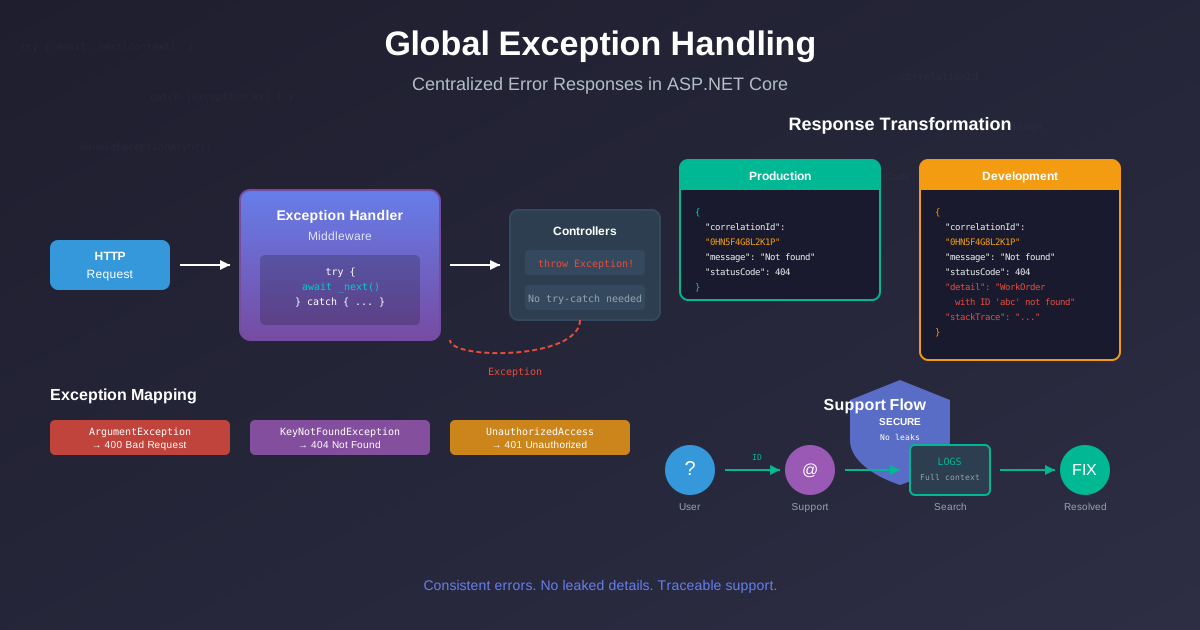
ASP.NET Core middleware sits in the request pipeline. If you place an exception handler early enough, it catches errors from everything downstream—controllers, other middleware, the works.
public class GlobalExceptionHandlerMiddleware
{
    private readonly RequestDelegate _next;
    private readonly ILogger<GlobalExceptionHandlerMiddleware> _logger;
    private readonly IHostEnvironment _environment;

    public GlobalExceptionHandlerMiddleware(
        RequestDelegate next,
        ILogger<GlobalExceptionHandlerMiddleware> logger,
        IHostEnvironment environment)
    {
        _next = next;
        _logger = logger;
        _environment = environment;
    }

    public async Task InvokeAsync(HttpContext context)
    {
        try
        {
            await _next(context);
        }
        catch (Exception ex)
        {
            await HandleExceptionAsync(context, ex);
        }
    }

    private async Task HandleExceptionAsync(HttpContext context, Exception exception)
    {
        var correlationId = context.TraceIdentifier;

        _logger.LogError(exception,
            "Unhandled exception. CorrelationId: {CorrelationId}, Path: {Path}",
            correlationId, context.Request.Path);

        var (statusCode, message) = exception switch
        {
            ArgumentException => (400, "Invalid request parameters."),
            KeyNotFoundException => (404, "The requested resource was not found."),
            UnauthorizedAccessException => (401, "You are not authorized."),
            InvalidOperationException => (409, "The operation could not be completed."),
            _ => (500, "An unexpected error occurred.")
        };

        var errorResponse = new
        {
            correlationId,
            message,
            statusCode,
            // Only include details in non-production
            detail = _environment.IsProduction() ? null : exception.Message,
            stackTrace = _environment.IsDevelopment() ? exception.StackTrace : null
        };

        context.Response.StatusCode = statusCode;
        context.Response.ContentType = "application/json";
        await context.Response.WriteAsJsonAsync(errorResponse);
    }
}
The Correlation ID Trick
Notice the context.TraceIdentifier? ASP.NET Core generates this automatically for every request. It's the same ID that appears in your logs.
When a user reports "I got an error," they give you the correlation ID. You search your logs for that ID. You find the full stack trace, the request path, the user context—everything you need to debug.
Production response:
{
  "correlationId": "0HN5F4G8L2K1P:00000001",
  "message": "The requested resource was not found.",
  "statusCode": 404
}
Development response:
{
  "correlationId": "0HN5F4G8L2K1P:00000001",
  "message": "The requested resource was not found.",
  "statusCode": 404,
  "detail": "WorkOrder with ID 'abc123' was not found",
  "stackTrace": "   at Api.Services.WorkOrderService.GetByIdAsync..."
}
Production never leaks internals. Development gives you everything.
Exception Type Mapping
The pattern switch maps specific exceptions to appropriate HTTP status codes:
| Exception | Status | When to Use |
|---|---|---|
ArgumentException |
400 | Invalid input |
KeyNotFoundException |
404 | Resource doesn't exist |
UnauthorizedAccessException |
401 | Authentication required |
InvalidOperationException |
409 | Business rule violation |
| Default | 500 | Unexpected errors |
You can extend this with custom exception types:
public class BusinessRuleException : Exception
{
    public string Code { get; }
    public BusinessRuleException(string code, string message) : base(message)
    {
        Code = code;
    }
}

// In the switch:
BusinessRuleException bre => (422, bre.Message),
Middleware Placement
Order matters. Place the exception handler early to catch errors from all downstream middleware:
app.UseGlobalExceptionHandler();  // First - catches everything below
app.UseHttpsRedirection();
app.UseAuthentication();          // Errors here get caught
app.UseAuthorization();           // Errors here get caught
app.MapControllers();             // Errors here get caught
If you put it after authentication middleware, authentication errors won't be caught.
What About IExceptionFilter?
IExceptionFilter only catches controller exceptions. If something throws in middleware—authentication, CORS, rate limiting—the filter never sees it.
Middleware catches everything.
What About UseExceptionHandler?
The built-in app.UseExceptionHandler("/error") works but requires more boilerplate. You need a separate error controller, you lose direct access to the exception in the response logic, and customizing the response format is awkward.
Custom middleware gives you full control in one place.
The User Support Flow
- User sees an error with correlation ID:
ERR-0HN5F4G8L2K1P - User emails support: "Got error ERR-0HN5F4G8L2K1P"
- Support searches logs for that ID
- Support finds: full stack trace, request path, user ID, timestamp
- Developer fixes the bug
No more "Can you describe what you were doing?" No more "Try clearing your cache." Just the correlation ID.
For extra credit, format your correlation IDs using Crockford Base32 so users can read them over the phone.
Testing
[Fact]
public async Task GlobalExceptionHandler_ReturnsJson_OnException()
{
    var factory = new WebApplicationFactory<Program>();
    var client = factory.CreateClient();

    var response = await client.GetAsync("/api/test/throw");

    Assert.Equal(HttpStatusCode.InternalServerError, response.StatusCode);
    Assert.Equal("application/json", response.Content.Headers.ContentType?.MediaType);

    var error = await response.Content.ReadFromJsonAsync<ErrorResponse>();
    Assert.NotNull(error?.CorrelationId);
}
Benefits
After implementing centralized exception handling:
- Consistency: Every error returns the same JSON structure
- Security: Production never exposes internals
- Debuggability: Correlation IDs link user reports to server logs
- Clean controllers: No defensive try-catch everywhere
The middleware is simple, testable, and gives you full control. Every API should have it.
Part of the Production Hardening series. See also: Error Boundaries That Don't Trap Users for the client-side equivalent in Blazor.