I wrote a CI workflow walkthrough a few weeks ago. Understood every line. Felt good about it. Then I tried to make the workflow reusable — extract it into a shared template that both of my projects could consume — and spent an entire afternoon staring at a two-word error message with no logs, no stack trace, and no indication of what went wrong.
The error was startup_failure. That's it. That's all GitHub gives you.
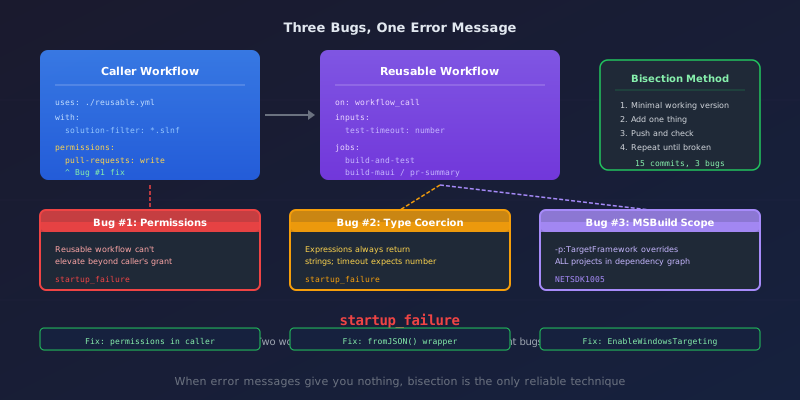
This is the story of finding three distinct bugs hidden behind that error, each requiring completely different knowledge to fix. If you're building reusable GitHub Actions workflows, every one of these will bite you eventually.
What We Were Building
I have two .NET MAUI projects — a workout tracker and a crew management app. Both need the same CI pattern: build and test on Ubuntu, compile-check MAUI on macOS, post test summaries on PRs.
Instead of maintaining two copies of the same 200-line workflow, I extracted it into a reusable workflow. The caller is clean:
jobs:
  ci:
    uses: ./.github/workflows/dotnet-ci-reusable.yml
    with:
      solution-filter: "MyApp.CI.slnf"
      maui-project: "MyApp.App/MyApp.App.csproj"
      smoke-test-url: "http://localhost:5099/health"
    secrets: inherit
Good engineering. Clean abstraction. Except it didn't work.
The Symptom
Every push:
conclusion: startup_failure
status: completed
No jobs created. No logs. The GitHub API returned zero check runs. The workflow completed before it even started. It's like a compiler that says "error" without a line number — technically it told you something went wrong, but it told you nothing useful about what.
I tried the obvious things. YAML syntax — valid. File path — correct. Repo — public. Actions — enabled. Everything looked fine.
So I did the only thing that works when error messages give you nothing.
The Bisection
Bisection isn't clever. It isn't fast. It's just methodical. Start with something that works, add things back one at a time, push, wait, check.
Minimal reusable workflow with one echo step? Works.
All 13 inputs added? Works.
The env: block? Works.
The build-and-test job (full checkout, restore, build, test)? Works.
The build-maui job (macOS, MAUI workloads)? Works.
The pr-summary job? startup_failure.
Found it. But what about pr-summary? I stripped it to a bare echo with needs and if — worked fine. Added the permissions block back:
permissions:
  pull-requests: write
  checks: write
startup_failure.
Eight pushes. Eight waits. But now I knew exactly which two lines were the problem.
Bug #1: Reusable Workflows Can't Elevate Permissions
Here's the rule that isn't obvious from the documentation: reusable workflows can only downgrade permissions from the caller, never elevate them.
My repo has default_workflow_permissions set to read — the recommended security setting. The caller workflow didn't specify any permissions, so it inherited the default. When the reusable workflow's pr-summary job requested pull-requests: write, it was asking for more than the caller ever granted.
GitHub's response? startup_failure. No error message. No "insufficient permissions." Just... failure.
The fix: the caller must grant the permissions:
jobs:
  ci:
    uses: ./.github/workflows/dotnet-ci-reusable.yml
    permissions:
      contents: read
      pull-requests: write
      checks: write
    with:
      solution-filter: "MyApp.CI.slnf"
This is counterintuitive. You'd expect job-level permissions in the reusable workflow to be self-contained. They're not. The caller's permissions are the ceiling, and the reusable workflow operates within that ceiling.
Bug #2: timeout-minutes Rejects Input Expressions
With the permissions fix in place, the workflow ran. But I'd also been carrying a second bug that I'd accidentally fixed during bisection by removing the timeout temporarily.
The reusable workflow had configurable timeouts:
inputs:
  test-timeout-minutes:
    type: number
    default: 15

jobs:
  build-and-test:
    timeout-minutes: ${{ inputs.test-timeout-minutes }}
This looks correct. The input is type: number. The field expects a number. Should just work.
It doesn't. GitHub Actions expressions always return strings, even when the input type is number. The timeout-minutes field does strict type checking at parse time and rejects the string "15" when it expects the number 15.
The same error. startup_failure. Different root cause entirely.
The fix:
timeout-minutes: ${{ fromJSON(inputs.test-timeout-minutes) }}
fromJSON() converts the string "15" back into the number 15. This is documented in a GitHub runner issue from 2022, but it's not mentioned in the main workflow syntax documentation. You'd only find it if you knew to search for it. Which you wouldn't, because the error message doesn't mention types, numbers, or timeout-minutes.
Bug #3: -p:TargetFramework Is a Global MSBuild Property
With the first two bugs fixed, the workflow actually ran. build-and-test passed. But build-maui failed with:
error NETSDK1005: Assets file doesn't have a target for 'net9.0'.
The MAUI project multi-targets: Android, iOS, macCatalyst, and Windows. Building on macOS with all targets fails because the Windows SDK isn't available. The common advice is to scope the restore:
dotnet restore MyApp.UI.csproj -p:TargetFramework=net9.0-android
dotnet build MyApp.UI.csproj --no-restore -f net9.0-android
Looks right. Restore for Android only, build for Android only.
Except -p:TargetFramework is a global MSBuild property. When you pass it on the command line, it overrides TargetFramework for every project in the dependency graph — not just the one you're restoring.
MyApp.UI depends on MyApp.Application, which depends on MyApp.Core. Those are plain net9.0 libraries. They don't multi-target. When -p:TargetFramework=net9.0-android hits them, their assets.json files get written for the wrong framework. Then the build step tries to compile them as net9.0 and finds assets for net9.0-android.
The -f flag on dotnet build doesn't have this problem — it only scopes to the top-level project. But dotnet build's implicit restore does resolve all targets, which brings back the Windows error on macOS.
The fix is a two-step approach:
# Restore all TFMs — suppress Windows error on macOS
dotnet restore MyApp.UI.csproj -p:EnableWindowsTargeting=true

# Build only the target we want, skip restore
dotnet build MyApp.UI.csproj --no-restore -c Release -f net9.0-android
EnableWindowsTargeting=true tells NuGet it's OK to resolve Windows frameworks on non-Windows systems. The restore creates valid assets for all targets including the transitive net9.0 dependencies. Then -f builds only Android and --no-restore skips the implicit restore entirely.
This is the kind of bug that looks like a NuGet issue, smells like a framework compatibility issue, but is actually a fundamental misunderstanding of how MSBuild property scoping works.
Three Bugs at a Glance
| Bug | Symptom | Root Cause | Fix |
|---|---|---|---|
| Caller permissions | startup_failure |
Reusable workflows can't elevate beyond caller's grant | Add permissions: to the calling job |
timeout-minutes type |
startup_failure |
Input expressions return strings; field expects number | Wrap in fromJSON() |
-p:TargetFramework |
NETSDK1005 |
Global MSBuild property overrides transitive projects | EnableWindowsTargeting=true + -f |
Three bugs. Two produce the exact same error message. One produces a misleading error pointing at the wrong project. None are documented in the obvious places.
The Debugging Lesson
When an error message gives you nothing — no line number, no context, no suggestion — bisection is the only reliable technique.
- Start with the smallest thing that works.
- Add one thing.
- Push and check.
- Repeat until it breaks.
I pushed 15 test commits to narrow these down. Each took 20-30 seconds to get a result. The whole process took about two hours. There's no shortcut when the error reporting is this poor.
The alternative — guessing, searching Stack Overflow, trying random fixes — would have taken longer. I know because I tried that first.
What I'd Tell GitHub
startup_failure needs better error reporting. At minimum:
- Which file has the problem (caller or callee?)
- Which line triggered the validation failure
- What specifically is invalid (type mismatch? missing permission? unsupported expression?)
The runner issue about timeout-minutes was opened in 2022. The workaround was posted in a comment. The main documentation still doesn't mention it. That's a long time to leave a trap.
In the meantime, if you're building reusable workflows, bookmark this post. You're going to hit at least one of these.
This is a follow-up to What Your CI Workflow Actually Does, which walks through a complete GitHub Actions workflow line by line.