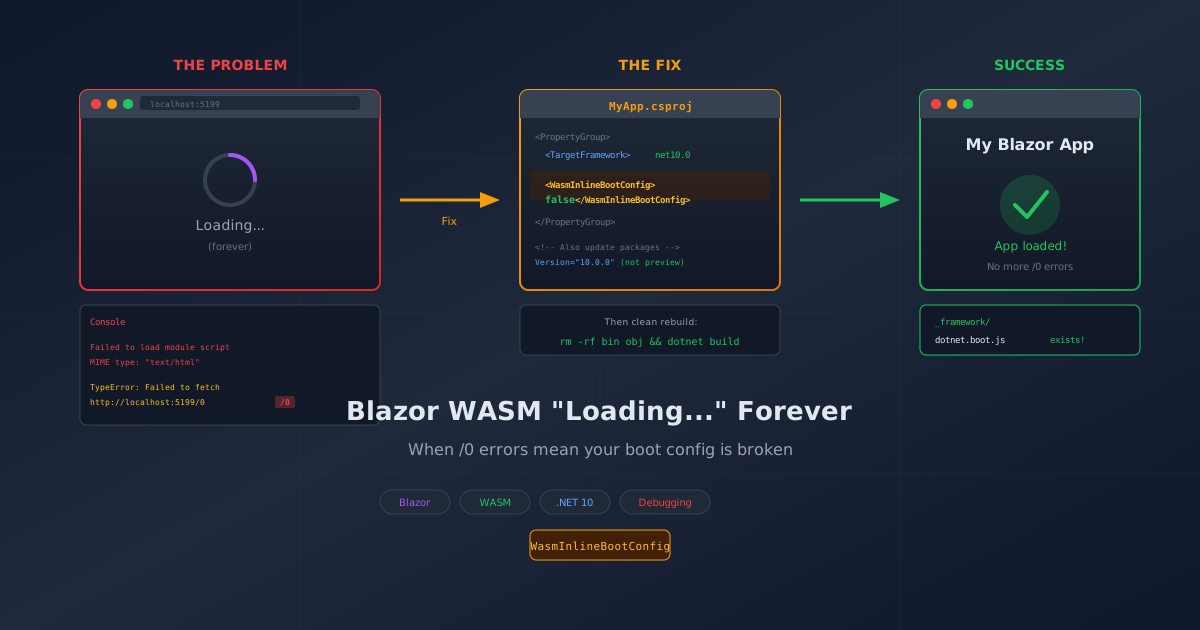
You've built a beautiful Blazor WebAssembly app. The HTML loads. Your carefully crafted loading spinner appears. And then... nothing. Just "Loading..." forever. The server is running. The files exist. Everything should work.
Welcome to one of the more frustrating debugging sessions I've had in a while.
The Symptom
The Blazor WASM app loads the initial HTML page perfectly. The loading indicator appears, doing its little spinny thing. But the actual Blazor application never starts. The page just sits there, mocking you with an infinite loading state.
Opening the browser Developer Tools (F12) reveals a wall of angry red errors:
Failed to load module script: Expected a JavaScript-or-Wasm module script
but the server responded with a MIME type of "text/html".

MONO_WASM: onConfigLoaded() failed TypeError: Failed to fetch dynamically
imported module: http://localhost:5199/0

MONO_WASM: Failed to load config file undefined TypeError: Failed to fetch
dynamically imported module: http://localhost:5199/0
Notice that bizarre URL: http://localhost:5199/0. The browser is trying to load a module from /0. That's not a real file. That's not even a reasonable guess at a file. That's a bug.
The Investigation
My first instinct was the usual suspects:
- Browser cache? Hard refresh didn't help. Neither did clearing the cache entirely.
- Wrong URL? Nope, using the correct
http://localhost:5199. - Missing packages? The
DevServerpackage was there. - Server not running properly? All resources returned HTTP 200.
I spent an embarrassing amount of time verifying every HTTP request. The server was serving all files correctly:
/_framework/blazor.webassembly.js— 200 OK/_framework/dotnet.js— 200 OK/_framework/*.wasmfiles — 200 OK
Everything looked perfect on the server side. The problem was somewhere in the client-side initialization.
The Clue
The key was in that strange /0 URL. The browser was trying to dynamically import a module, but the path was completely wrong. This pointed to something in the boot configuration being malformed.
In .NET 10, Microsoft introduced a feature called inline boot config. Instead of generating a separate blazor.boot.json or dotnet.boot.js file, the boot configuration gets embedded directly into dotnet.js. This is meant to reduce HTTP requests and improve startup time.
The problem? It's buggy. Or at least, it was in my environment.
The Root Cause
Two issues combined to create this mess:
Issue 1: Inline Boot Config Bug
The WasmInlineBootConfig feature in .NET 10 has a bug that can cause the boot configuration to be malformed. When the browser tries to parse it, the module paths get corrupted, resulting in requests to nonsensical URLs like /0.
The browser dutifully tries to fetch /0, the server returns a 404 HTML page, and the WASM loader chokes on receiving HTML when it expected JavaScript. Hence the "MIME type of text/html" error.
Issue 2: Stale Preview Package References
The project was still referencing preview versions of the packages:
<PackageReference Include="Microsoft.AspNetCore.Components.WebAssembly"
    Version="10.0.0-preview.1.25120.3" />
While .NET 10 has been officially released, these old preview packages were sitting in the csproj from early development. Preview packages can behave differently than release versions—that's why they're previews.
The Fix
Two changes fixed everything:
Step 1: Disable Inline Boot Config
Add this to your PropertyGroup in the .csproj file:
<PropertyGroup>
    <TargetFramework>net10.0</TargetFramework>
    <Nullable>enable</Nullable>
    <ImplicitUsings>enable</ImplicitUsings>
    <!-- Disable inline boot config to fix WASM loading issue -->
    <WasmInlineBootConfig>false</WasmInlineBootConfig>
</PropertyGroup>
This tells the build to generate a separate dotnet.boot.js file instead of inlining the configuration. The separate file works correctly.
Step 2: Update Package References
Update to the release versions:
<ItemGroup>
    <PackageReference Include="Microsoft.AspNetCore.Components.WebAssembly"
        Version="10.0.0" />
    <PackageReference Include="Microsoft.AspNetCore.Components.WebAssembly.DevServer"
        Version="10.0.0" PrivateAssets="all" />
</ItemGroup>
Step 3: Clean Rebuild
Delete bin/ and obj/ folders, then rebuild:
rm -rf bin obj
dotnet build
On Windows:
Remove-Item -Recurse -Force bin, obj
dotnet build
This ensures the new boot file is generated fresh without any cached artifacts from the broken build.
Verification
After the fix, check that dotnet.boot.js exists in your build output:
ls bin/Debug/net10.0/wwwroot/_framework/ | grep boot
You should see:
dotnet.boot.js
dotnet.boot.js.gz
If you still only see the boot config inlined in dotnet.js (no separate boot file), the setting didn't take effect. Double-check your csproj and make sure you did a clean rebuild.
Why This Bug Is Particularly Evil
This one earns a special place in my debugging hall of shame because:
- The server works perfectly — All HTTP requests return 200 OK for the files that exist
- The error message is misleading — "Failed to fetch
/0" doesn't exactly scream "check your boot config" - It's a new .NET 10 feature — Most Stack Overflow answers assume the old
blazor.boot.jsonapproach - It works sometimes — The bug might not manifest in all environments, making it hard to reproduce
- The loading indicator works — You see something, which tricks you into thinking the app is starting
Lessons Learned
When debugging Blazor WASM loading issues:
- Always check the browser console — The actual error is there, even if cryptic
- Look for nonsensical URLs —
/0,/undefined, or similar paths indicate config parsing issues - Check your package versions — Preview packages can behave differently than releases
- Know your .NET version's new features — New optimizations can introduce new bugs
- When in doubt, disable the new stuff —
WasmInlineBootConfig=falseis a safe fallback until the bugs get fixed
Complete Working Configuration
Here's the full csproj that works:
<Project Sdk="Microsoft.NET.Sdk.BlazorWebAssembly">

  <PropertyGroup>
    <TargetFramework>net10.0</TargetFramework>
    <Nullable>enable</Nullable>
    <ImplicitUsings>enable</ImplicitUsings>
    <WasmInlineBootConfig>false</WasmInlineBootConfig>
  </PropertyGroup>

  <ItemGroup>
    <PackageReference Include="Microsoft.AspNetCore.Components.WebAssembly"
        Version="10.0.0" />
    <PackageReference Include="Microsoft.AspNetCore.Components.WebAssembly.DevServer"
        Version="10.0.0" PrivateAssets="all" />
  </ItemGroup>

</Project>
Wrapping Up
I probably would have spent another week on this if I hadn't stumbled onto the boot config angle. The combination of a working server, misleading error messages, and a new .NET 10 feature created the perfect storm of confusion.
If you're stuck on the eternal "Loading..." screen with weird /0 errors in your console, now you know: disable inline boot config and update your packages.
Sometimes the fix is one line of XML. Finding that line? That's the adventure.
Have you hit other .NET 10 Blazor WASM gotchas? Drop a comment below—misery loves company in debugging.